Bug #473
closedLarge Empty Space Below Add Studies Catalog on New Order Page
0%
Description
Summary
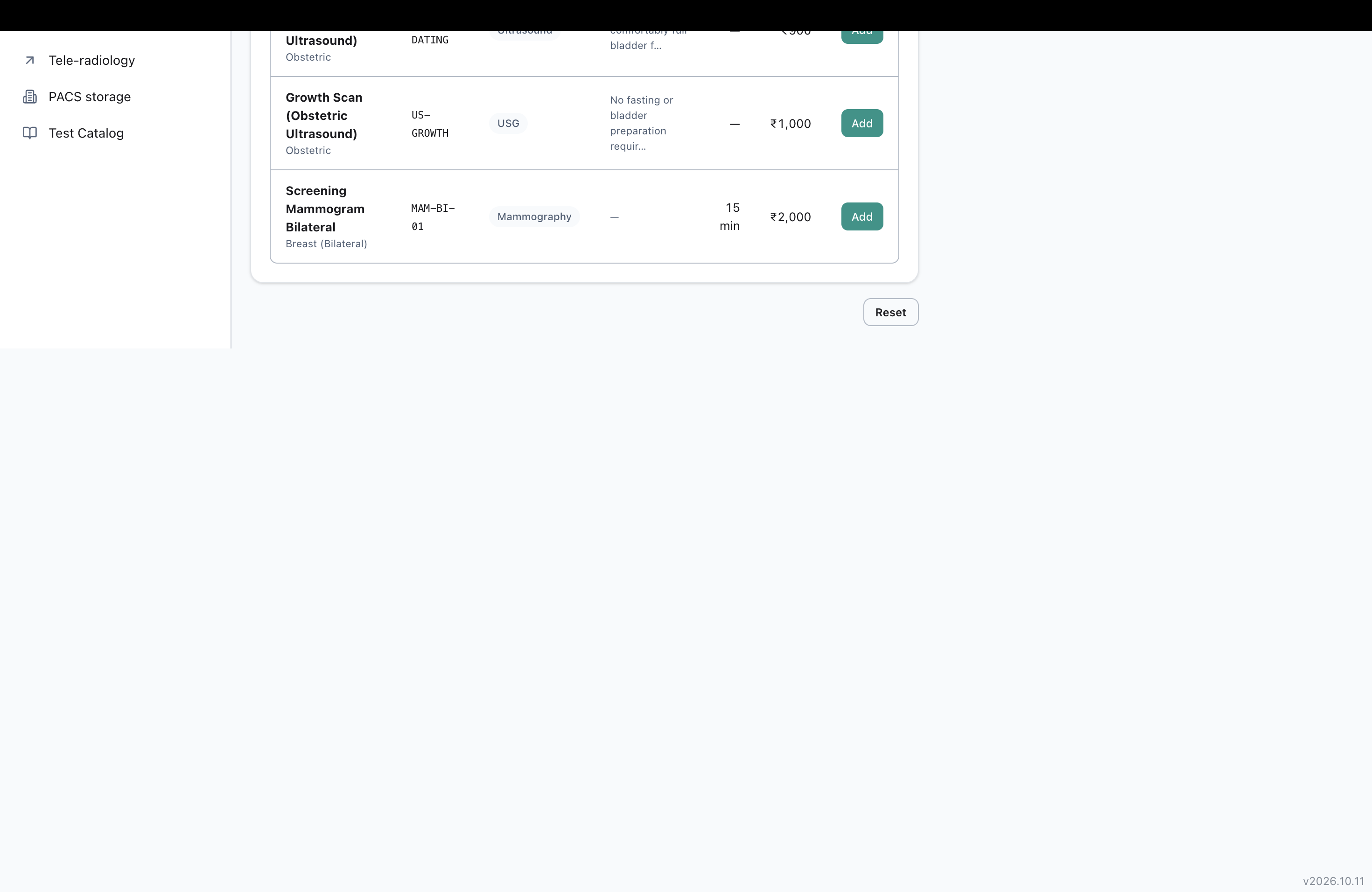
On the New Order page, under step 3 ("Add studies"), scrolling the page down past the end of the study catalog list leaves a large empty blank area with no content, before the page footer appears.
Impact
Low severity, cosmetic. The page looks broken/unfinished past the catalog list, and users scrolling down see a large blank gap with nothing in it before reaching the footer. No functional blocker, but it looks like a layout bug.
Environment
Clinq HMS demo environment, NSS Hospital (nssh.demo.clinq.health), New Order page (Radiology Orders > New Order). Tested 20 October 2026.
Steps to Reproduce
- Go to Radiology Orders > New Order.
- Scroll down to step 3, "Add studies", which shows a table of catalog tests with Add buttons.
- Continue scrolling the page down past the bottom of this catalog list/table.
Expected vs Actual
Expected: the page content ends shortly after the catalog list, with normal spacing before the footer.
Actual: after the catalog list, there is a large empty white area with no content, extending most of the remaining viewport height, before the footer (version number) appears in the bottom corner.
Files

AV Updated by Alminta V. 22 days ago
- Assignee changed from Alminta V. to Sravan V S
S- Updated by SK - 12 days ago
- Status changed from In Progress to Resolved
- Assignee changed from SK - to Roshni Harish.
- Resolved By set to SK -
Root cause found and fixed, merged to dev on nuvita-diagnostics (58bfa16d).
The New Order page's two-column grid (left: numbered form sections, right: sticky order-summary cart) relies on the grid's default align-items: stretch so the sticky cart (right column) gets the full row height to travel within instead of un-sticking early - there's an existing code comment on this page explaining that was a deliberate earlier fix. But with no scoping, that same stretch also applies to the LEFT column, which has no internal flex layout to fill extra height. Once the cart (right column) grows taller than the left column's own content - which happens once a few studies are selected, since the cart list grows with each one - CSS grid stretches the left column's cell to match, and since nothing fills that extra space, it shows up as the large blank area below "3 - Add studies", before the footer. Matches the reported repro exactly.
Fix: added self-start to the left column's wrapper div only, so it always sizes to its own content, while the right column keeps the default stretch behavior (so the sticky cart's travel-room improvement is untouched). One line, no other layout changes.
Added a regression test (jsdom can't verify real rendered height, so it asserts the self-start class survives on the left column - confirmed red without the fix, green with it). Full portal test:unit suite and type-check both pass; two pre-existing, unrelated failures found during verification (radiology/reports page test, and a stale UI-conventions-guard allowlist count on OrderWorklistModal.tsx, both predating this change, last touched before I started) are not part of this fix - flagging separately, not fixing here to keep this change scoped.
QA change-log entry added. Assigning to Roshni for QA sign-off.
RH Updated by Roshni Harish. 9 days ago
- File Screenshot 2026-11-04 at 4.36.09 PM.png Screenshot 2026-11-04 at 4.36.09 PM.png added
- Status changed from Resolved to Feedback
- Assignee changed from Roshni Harish. to SK -
Retest Update (2026-11-04): Also Happens on Other Pages, Not Just New Order
Short version: the fix that went out only covers the New Order page. The same blank-space bug is showing up on other pages too, so it isn’t actually fixed everywhere yet.
What’s happening, in plain terms: on a page with two columns side by side — content on the left, something like a cart or summary on the right — the right column is allowed to grow taller as more gets added to it (more studies, more notes, whatever). When it grows, the left column stretches to match its height, even though it has nothing left to show in that extra space — leaving a big empty gap before the page’s footer buttons.
The fix that already shipped only tells New Order’s left column to stop stretching and hug its own content instead. It deliberately didn’t touch anything else, so any other page built the same way still has this gap.
Confirmed so far: OPD > Consultation > Details has the exact same gap (the blank area below the “No changes yet” box, before the Save draft / Sign & complete visit footer). It’s now also been seen on other pages beyond these two, not yet pinned down with screenshots.
S- Updated by SK - 4 days ago
- Status changed from Feedback to Resolved
- Assignee changed from SK - to Roshni Harish.
Already fixed on dev - no new code needed.
Commit 58bfa16d ("fix(radiology-portal): stop the New Order page's left column stretching into blank space below Add studies", karthick, 2026-10-31). Root cause: the two-column grid's default align-items: stretch meant that once the cart (right column) grew taller than the left column's own content (several studies selected), the left column's grid cell stretched to match it, but the left column's own div had no flex layout to fill that extra height - hence the large blank gap below "3 - Add studies", before the footer. Fix: self-start on the left column opts it back out of stretch so it always sizes to its own content; the right column (sticky cart) keeps the default stretch so it still travels the full row height and stays pinned next to a long left column.
Verified today: ran the dedicated regression test (page.test.tsx, "keeps the left column sized to its own content, not stretched by the cart column (#473)") against current dev - passes. Reassigning to Roshni for verification.
RH Updated by Roshni Harish. 3 days ago
- Status changed from Resolved to Closed