Bug #714
closedRecord Payment Blocks Submission When a Supplier Has Multiple Outstanding GRNs
0%
Description
In the Record Payment form, when a supplier has more than one outstanding GRN, every listed GRN’s “Settle against GRNs” box is validated as required (must be greater than zero) even for GRNs the user does not intend to pay against in that transaction. The box cannot be left blank or at zero, so the form cannot be submitted when the user only wants to settle one of several outstanding GRNs.
Environment
Tenant: San Jose St. Bonaventure (nssh.test.clinq.health)
Area: Pharmacy > Procurement > Purchasing > Payables > Record payment
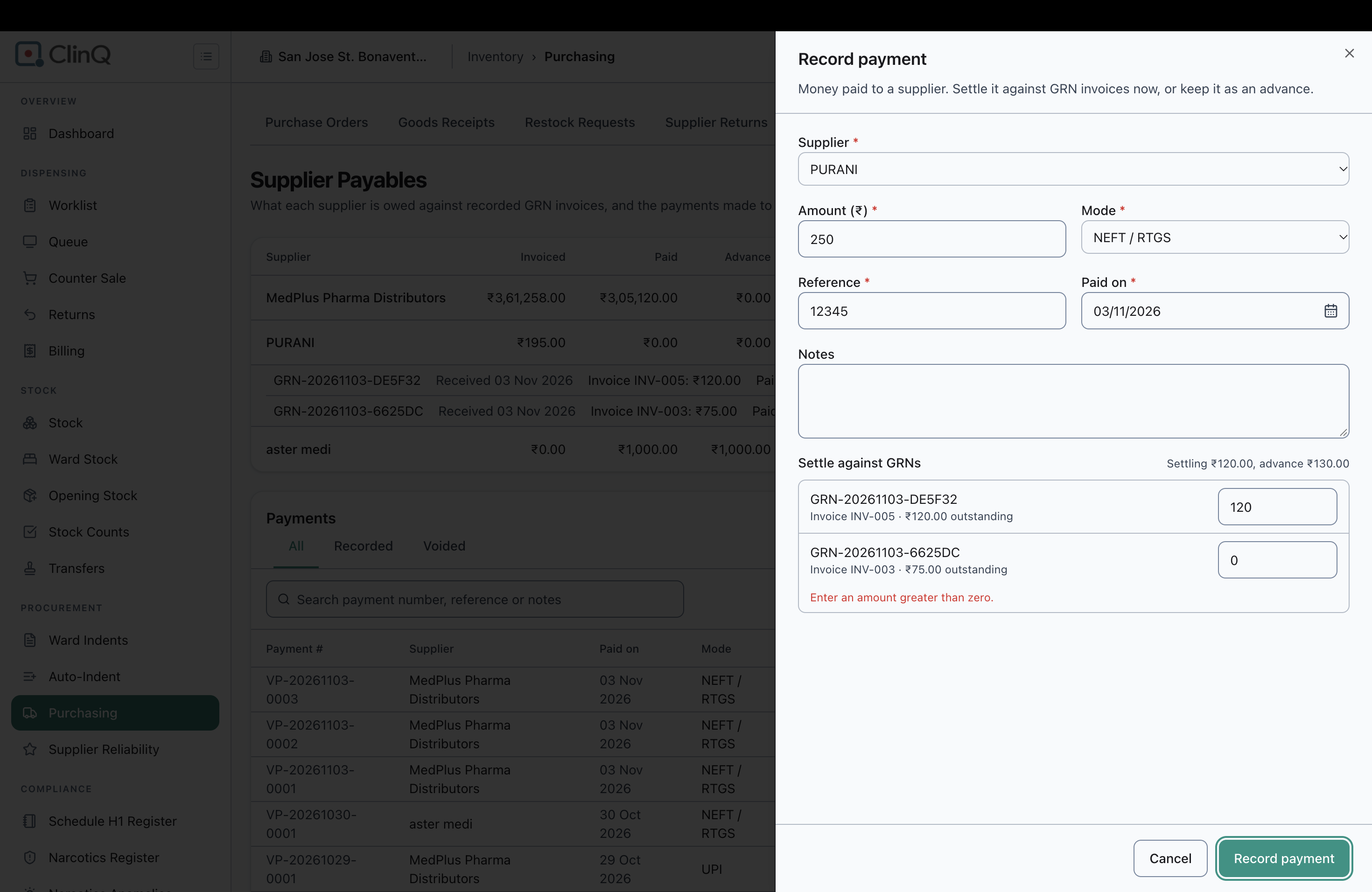
Supplier used to reproduce: PURANI, which had two outstanding GRNs at the time of testing: GRN-20261103-DE5F32 (Invoice INV-005, ₹120.00 outstanding) and GRN-20261103-6625DC (Invoice INV-003, ₹75.00 outstanding).
Steps to Reproduce
Go to Pharmacy > Purchasing > Payables for supplier PURANI, who has two outstanding GRNs (GRN-20261103-DE5F32 and GRN-20261103-6625DC).
Click “Record payment”. Supplier PURANI is selected.
Enter Amount ₹120.00 (the full outstanding amount of GRN-DE5F32 only, intending to settle only that one GRN). Set Mode, Reference and Paid on.
Under “Settle against GRNs”, both outstanding GRNs are listed. The GRN-DE5F32 box auto-fills with 120. The GRN-6625DC box defaults to 0.
The form immediately shows a validation error under the GRN-6625DC box: “Enter an amount greater than zero.”
Try to clear the GRN-6625DC box entirely (select all, Delete) to leave it blank/unallocated. The field will not stay empty — it reformats itself back to “0.00”, and the same error persists.
With the error showing, click “Record payment”. The form does not submit — the modal stays open with the GRN-6625DC error still displayed (confirmed live).
Expected Result
When a supplier has more than one outstanding GRN, the user should be able to settle only the GRN(s) they choose in a given payment and leave the others untouched. A GRN the user does not intend to pay against in this transaction should not require a positive amount — leaving its allocation box empty (or at zero) should simply mean “not settled in this payment” and should not block the payment from being recorded.
Actual Result
Every listed outstanding GRN’s allocation box is validated as required (greater than zero), with no way to leave it blank or at zero. The field itself will not even hold “0” — clearing it just causes the UI to reformat it back to “0.00”. As a result, there is no way to submit a payment that settles only some of a supplier’s outstanding GRNs when more than one GRN is listed: the Record Payment form gets stuck on the unwanted GRN’s validation error and cannot be submitted at all in this scenario.
Notes
This appears to be a validation bug specifically in the “Settle against GRNs” section of the Record Payment modal. It should allow a 0/blank allocation per GRN, validating only that total Settling plus Advance does not exceed the entered Amount (and that Settling against any one GRN does not exceed that GRN’s own outstanding balance) — not require every listed GRN to individually carry a positive amount.
Files
RH Updated by Roshni Harish. 9 days ago
- Assignee changed from SK - to Dilbar S.
RH Updated by Roshni Harish. 8 days ago
- Status changed from Resolved to Feedback
RH Updated by Roshni Harish. 8 days ago
- Assignee changed from Roshni Harish. to Dilbar S.
RH Updated by Roshni Harish. 8 days ago
- Status changed from Resolved to Closed