Bug #482
closedReading Worklist Filter Controls Disappear on Empty Result Set
0%
Description
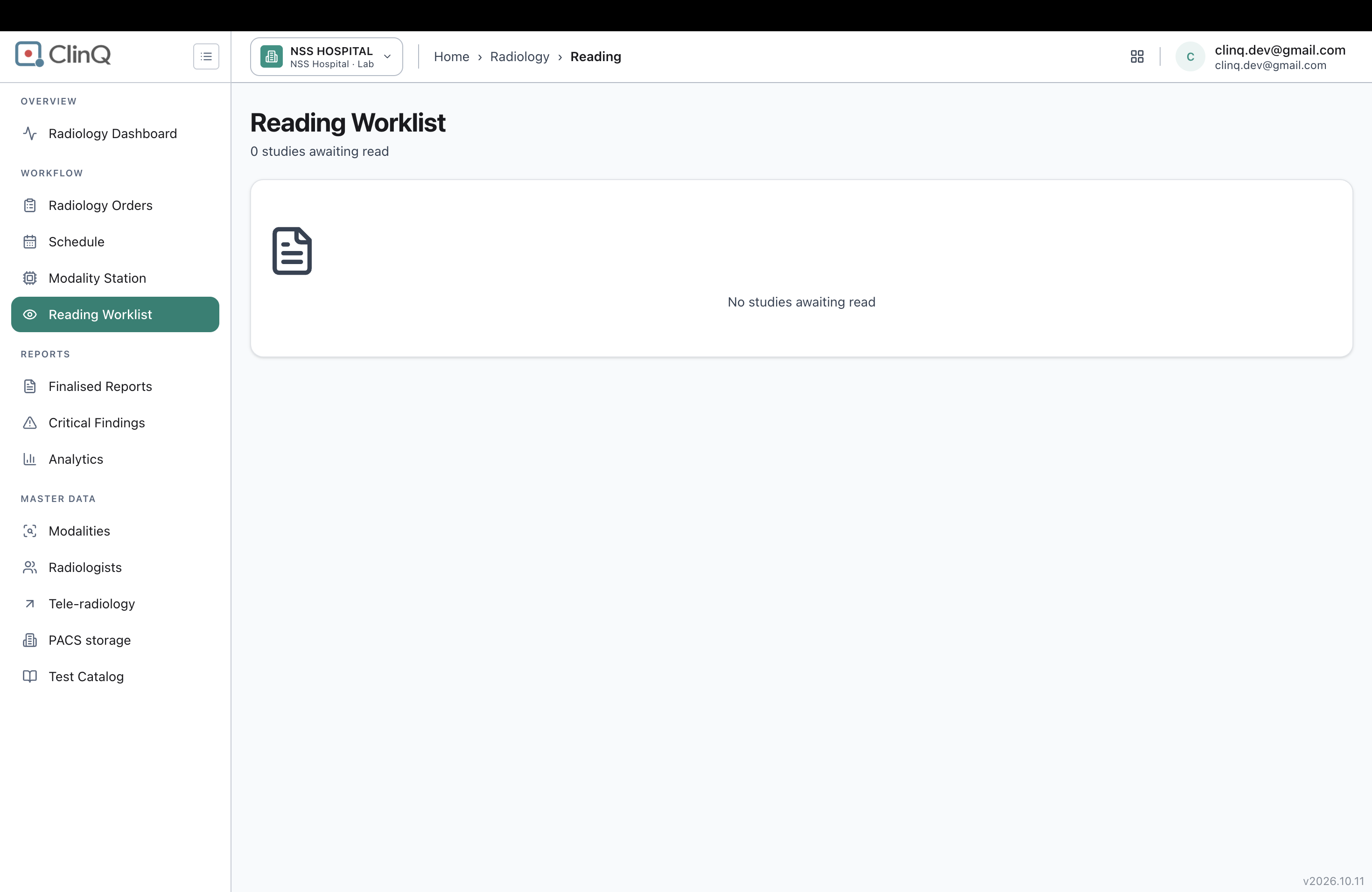
On the Reading Worklist page, selecting "My worklist" when the logged-in account has no studies assigned to it returns 0 results, and the entire filter toolbar (search box, modality dropdown, and the All studies/My worklist dropdown itself) disappears along with the table, leaving only an empty-state message. There is then no control left on the page to switch back to "All studies".
Impact
High severity, usability. This traps the user on an empty screen with no way to recover except a full page reload. It's especially likely to hit an admin account (which isn't assigned as a radiologist on any study) or any radiologist whose personal queue happens to be empty — both are completely normal situations, not edge cases, and both result in a dead end until the page is manually reloaded.
Environment
Clinq HMS demo environment, NSS Hospital (nssh.demo.clinq.health), Reading Worklist page, logged in as an admin account (clinq.dev@gmail.com) not assigned as a radiologist on any study. Tested 20 October 2026.
Steps to Reproduce
- Log in as an account that is not assigned as the radiologist on any study currently in the Reading Worklist (here, the admin account clinq.dev@gmail.com, with both studies assigned to "Nikhil Maheswar" and "Unassigned").
- Go to Radiology > Reading Worklist (starts on "All studies", showing 2 studies).
- Change the second filter dropdown from "All studies" to "My worklist".
- Observe the resulting page, including whether the search box and both filter dropdowns are still present.
Expected vs Actual
Expected: when "My worklist" returns 0 results, the search box and both filter dropdowns remain visible and usable, so the user can switch back to "All studies" directly from the empty-state screen.
Actual: the page shows only "0 studies awaiting read" and an empty-state icon with "No studies awaiting read" — the search box, modality dropdown, and the All studies/My worklist dropdown are all gone. Reloading the page (navigating to the Reading Worklist URL again) does reset the view back to "All studies" with the full filter bar and both studies, but there is no way to do this from within the page itself.
Files
AV Updated by Alminta V. 23 days ago
- Status changed from New to Resolved
- Assignee changed from Alminta V. to Roshni Harish.
- Resolved By set to Alminta V.
RH Updated by Roshni Harish. 22 days ago
- Status changed from Resolved to Closed