Bug #479
closedLapsed Appointment Not Flagged in Conflicts Queue or Order Status
0%
Description
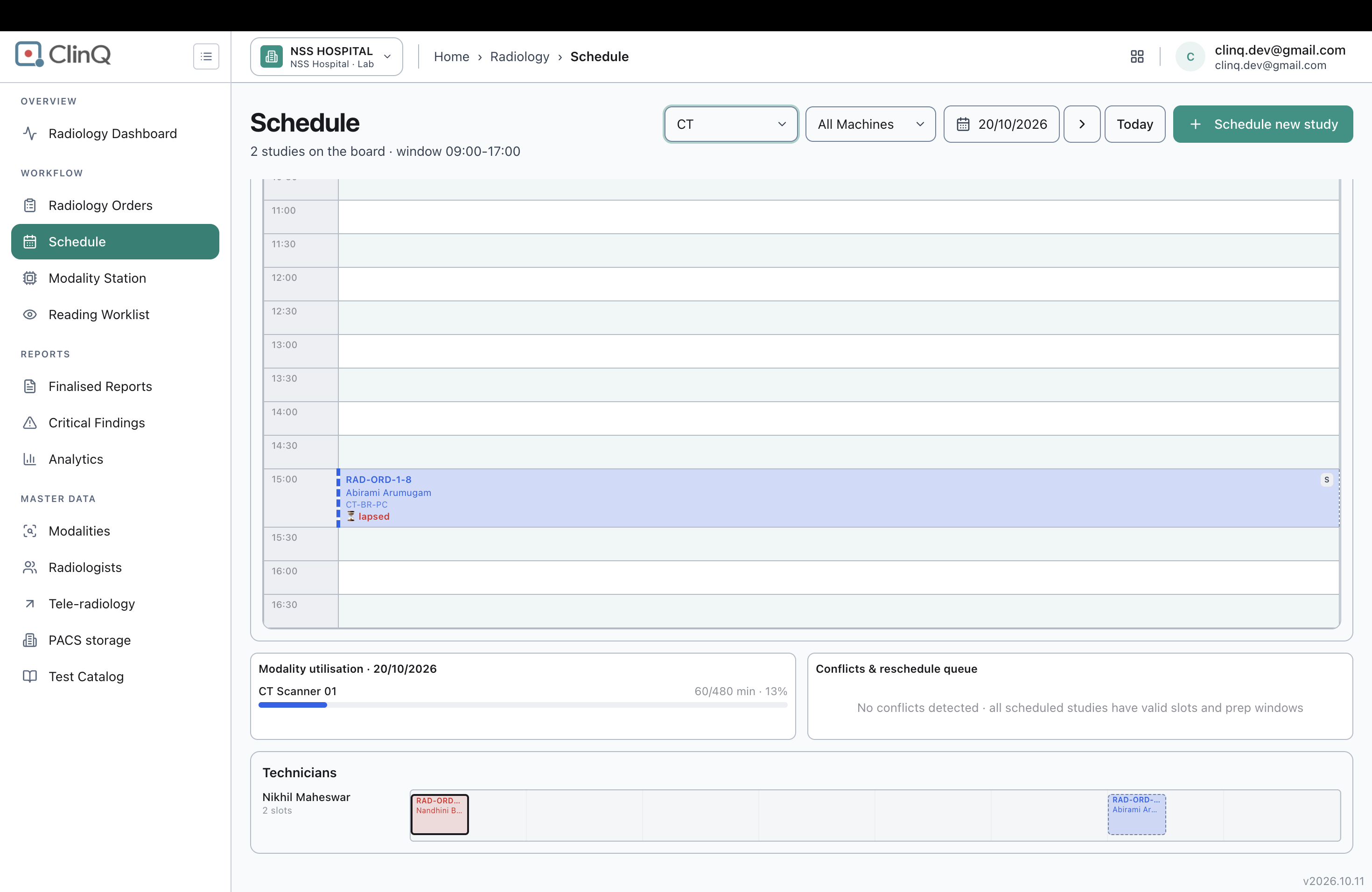
A soft-scheduled appointment whose booked time has already passed without the patient being checked in is marked "⏳ lapsed" on the Schedule page's resource board, but this is not surfaced anywhere else: the page's own "Conflicts & reschedule queue" panel doesn't flag it, and the order's status on the Radiology Orders worklist (Kanban) shows no indication anything needs attention.
Impact
Medium-high severity. A lapsed appointment effectively goes unnoticed unless staff happen to be viewing that exact modality/machine/date combination on the Schedule board at the right scroll position. The "Conflicts & reschedule queue" panel exists specifically to surface things needing rescheduling, and currently misses this case entirely. On the main Orders worklist, the order just sits under "Scheduled" looking normal, with none of the exception styling that postponed or no-show orders correctly get, so there's no prompt for staff to follow up or reschedule it.
Environment
Clinq HMS demo environment, NSS Hospital (nssh.demo.clinq.health), Schedule page and Radiology Orders worklist. Tested 20 October 2026.
Steps to Reproduce
- Go to Radiology > Schedule, set modality to CT, date to Today (20/10/2026).
- Scroll the CT Scanner 01 resource board to 15:00 and locate RAD-ORD-1-8 (Abirami Arumugam), a Soft (queue) booking marked "⏳ lapsed".
- Scroll down to the "Conflicts & reschedule queue" panel on the same page and check whether this order is listed.
- Separately, go to Radiology Orders (Kanban view) and find RAD-ORD-1-8's column and status styling.
Expected vs Actual
Expected: a lapsed appointment appears in the "Conflicts & reschedule queue" panel so staff reviewing that panel can catch and act on it, and/or the order shows some exception indicator on the main Orders worklist so it doesn't look like a normal, on-track Scheduled order.
Actual: the Conflicts & reschedule queue panel reads "No conflicts detected · all scheduled studies have valid slots and prep windows" despite RAD-ORD-1-8 being lapsed. On the Orders Kanban, RAD-ORD-1-8 sits under the "Scheduled" column with no exception tag, unlike RAD-ORD-1-5 and RAD-ORD-1-4 in the Exceptions column, which correctly show "Postponed" and "No-show" labels.
Files