Bug #468
closedRadiology Orders Table View Shows Wrong Priority
0%
Description
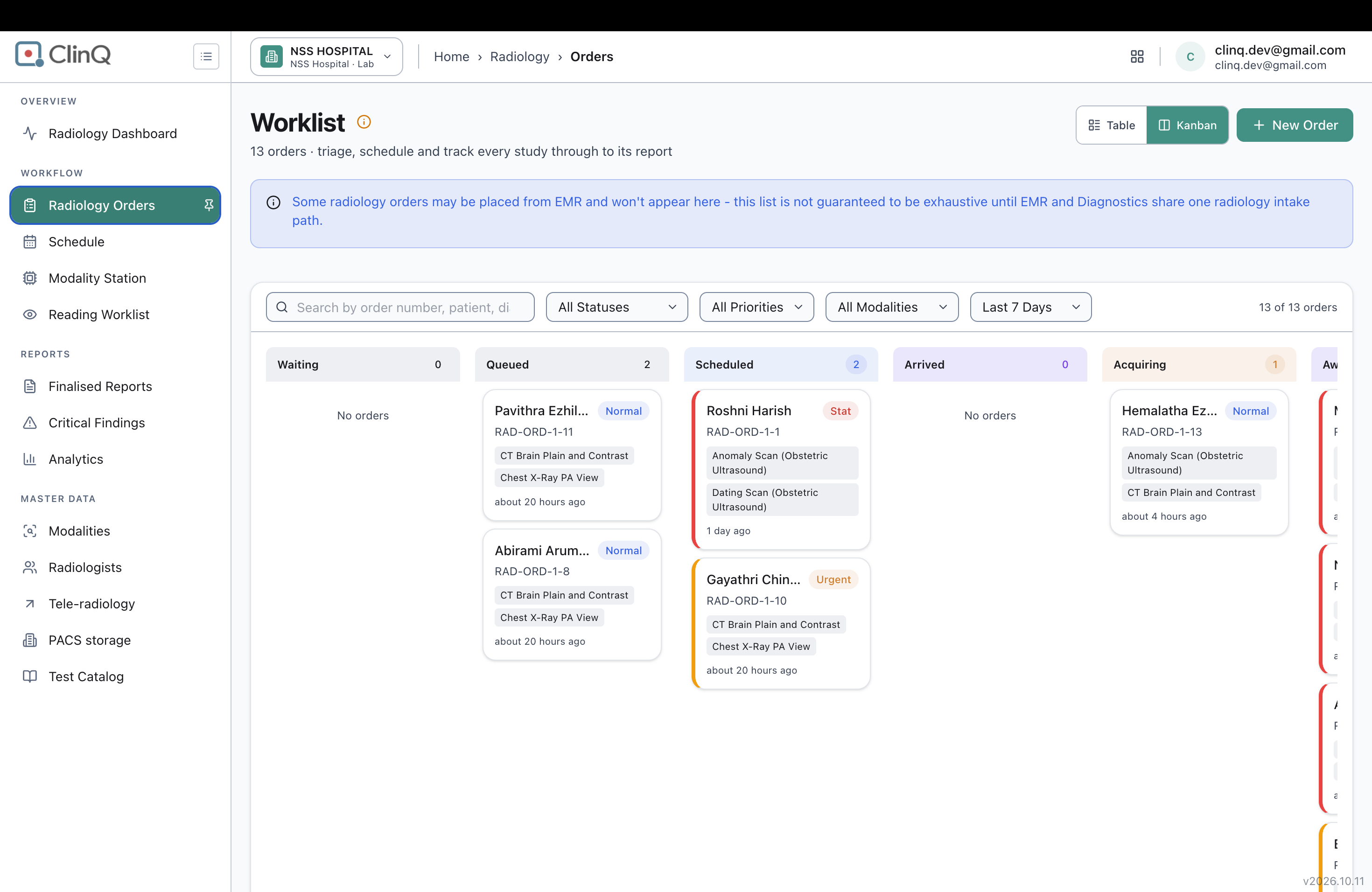
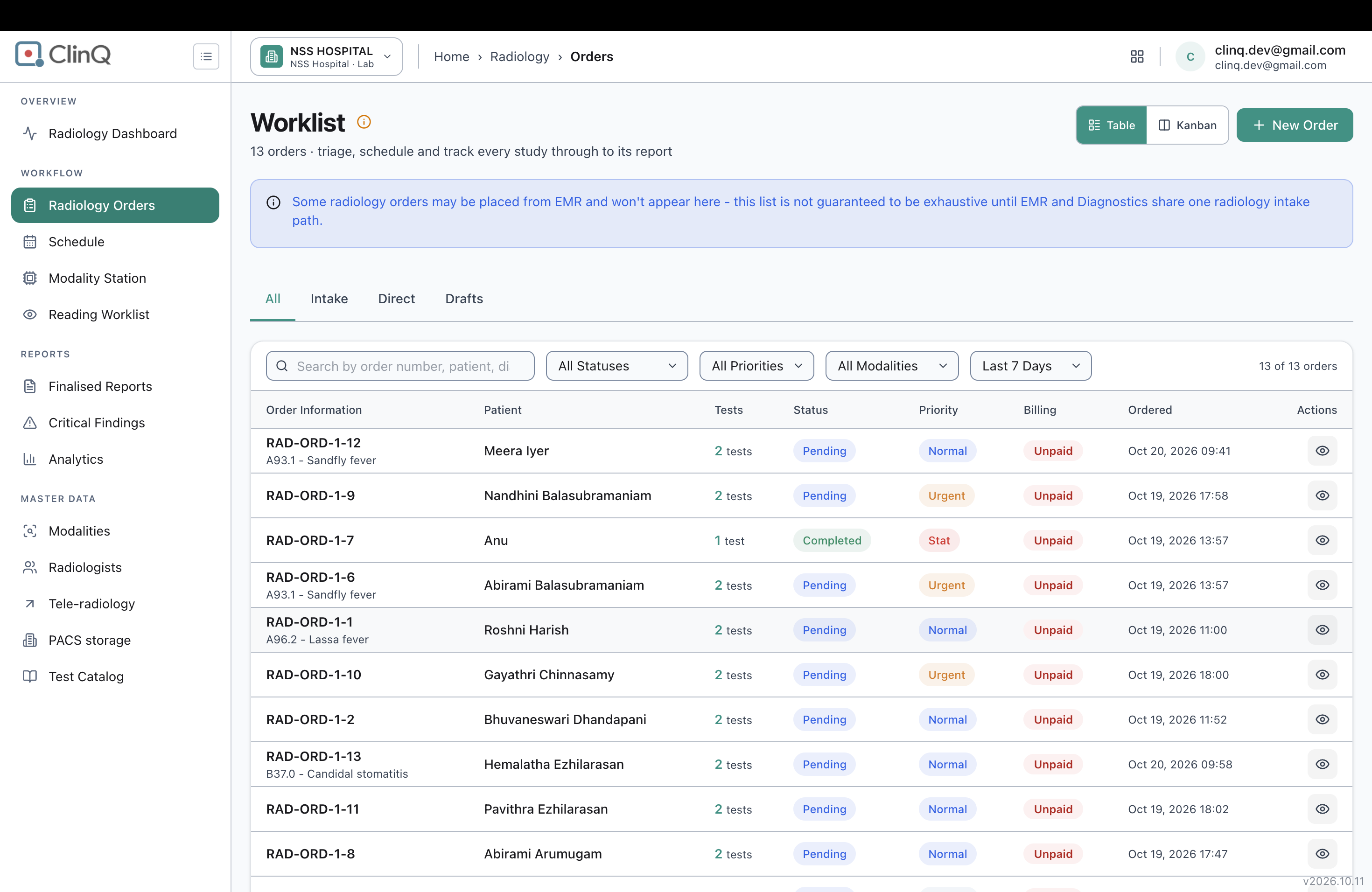
Switching the Radiology Orders Worklist from Kanban view to Table view shows a different, and usually lower, priority for a large share of the open orders. The Kanban board and each order's own quick-view popup agree with each other, but the Table view's Priority column doesn't match either of them for 6 of the 13 orders currently on the list.
Impact
High. Table and Kanban are presented as two equal ways to look at the same order list — a toggle at the top of the page, with no warning that one of them might be wrong. Anyone who works from Table view (for example, to sort or scan the list quickly) would see several Stat and Urgent orders downgraded to Normal or Routine, and could easily miss which patients actually need attention first.
Environment
Tested on https://nssh.demo.clinq.health (NSS Hospital demo, build v2026.10.11), Diagnostics > Radiology > Radiology Orders (the Worklist page), comparing its Kanban view against its Table view and against each order's quick-view popup (opened from the eye icon in the Table view's Actions column).
Checked live on 20 Oct 2026, logged in as clinq.dev@gmail.com (admin). Nothing was changed on the orders themselves during this check — priority was only read, not edited.
Steps to Reproduce
- Open Radiology Orders. It opens in Kanban view by default — note the priority tag shown on each order's card.
- Click the "Table" toggle at the top right of the page to switch views.
- Compare the Priority column in the table against the priority noted from the Kanban cards in step 1.
- For any order where the two disagree, click the eye-shaped "Quick view" icon in that row's Actions column, and check the Priority shown in the popup that opens.
Expected vs Actual
Expected: the priority shown for a given order is the same everywhere it appears on this page — Kanban card, Table row, and quick-view popup — since it's the same underlying order.
Actual: 6 of the 13 orders currently on the Worklist show a different priority in Table view than on the Kanban board. In every mismatched case, Table view shows a lower priority than Kanban:
RAD-ORD-1-1 (Roshni Harish): Stat on Kanban, Normal in Table. RAD-ORD-1-2 (Bhuvaneswari Dhandapani): Urgent on Kanban, Normal in Table. RAD-ORD-1-5 (Meera Iyer): Normal on Kanban, Routine in Table. RAD-ORD-1-6 (Abirami Balasubramaniam): Stat on Kanban, Urgent in Table. RAD-ORD-1-9 (Nandhini Balasubramaniam): Stat on Kanban, Urgent in Table. RAD-ORD-1-12 (Meera Iyer): Stat on Kanban, Normal in Table.
The other 7 orders (RAD-ORD-1-3, 1-4, 1-7, 1-8, 1-10, 1-11, 1-13) show the same priority in both views, so this isn't a problem with every order — only some.
I opened the quick-view popup directly for two of the six mismatched orders, RAD-ORD-1-1 and RAD-ORD-1-9, to check which view is actually correct. Both times the popup showed Stat — agreeing with the Kanban board, not the Table view. That's a strong signal Kanban and the quick-view are reading the correct, current priority, and Table view is the one showing a stale or wrongly-mapped value, though I didn't individually re-check the other four mismatched orders the same way.
Files
AV Updated by Alminta V. 23 days ago
- Status changed from New to Resolved
- Assignee changed from Alminta V. to Roshni Harish.
- Resolved By set to Alminta V.
RH Updated by Roshni Harish. 22 days ago
- Status changed from Resolved to Feedback
Table view do not show statuses correctly
RH Updated by Roshni Harish. 22 days ago
- Assignee changed from Roshni Harish. to Alminta V.
AV Updated by Alminta V. 20 days ago
- Status changed from Feedback to Resolved
- Assignee changed from Alminta V. to Roshni Harish.
RH Updated by Roshni Harish. 20 days ago
- Status changed from Resolved to Closed