Bug #465
closedPriority Filter Shows Orders Outside the Selected Priority
0%
Description
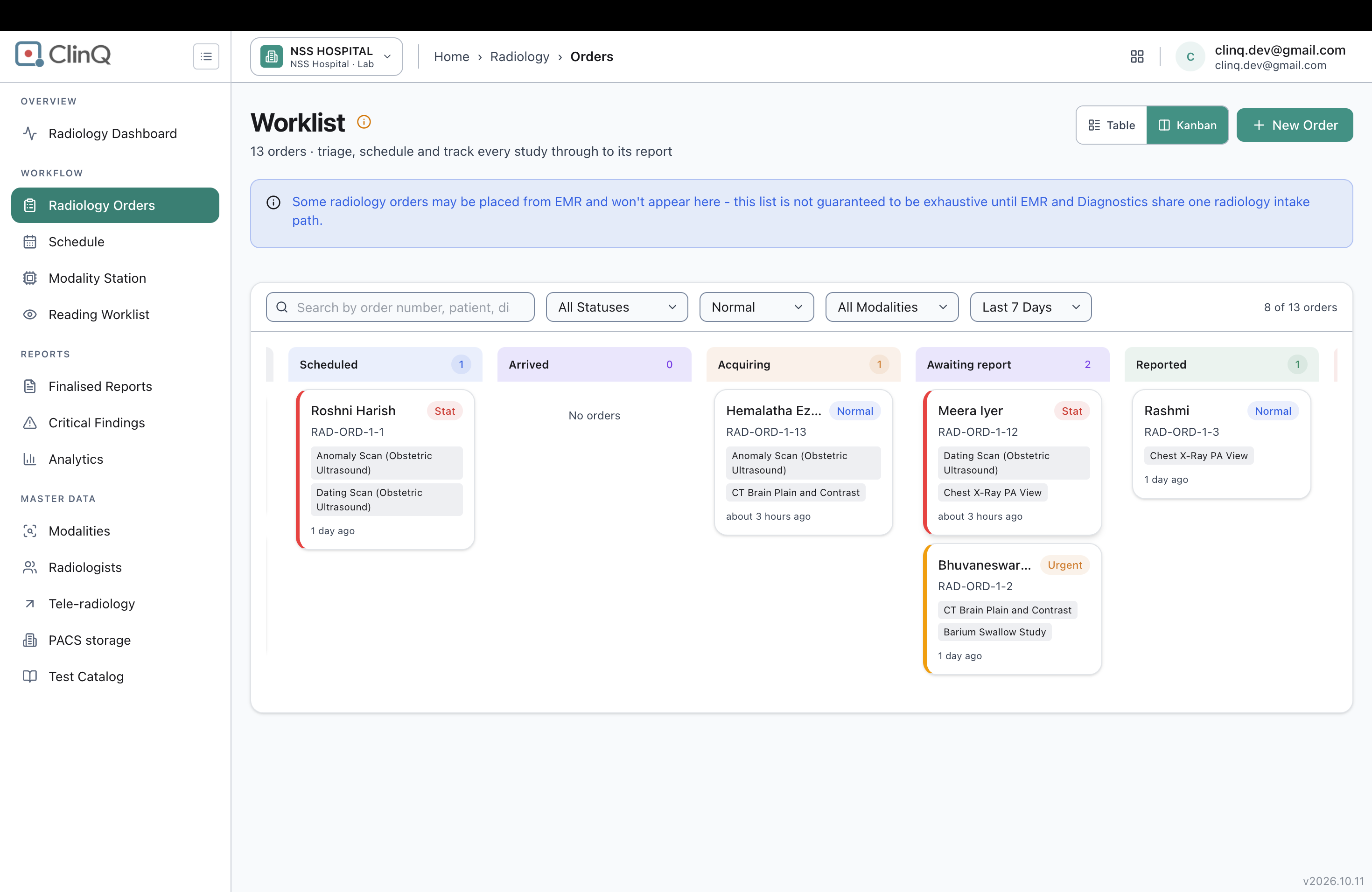
On the Radiology Orders worklist (Kanban view), setting the Priority filter to Normal does not limit the board to Normal-priority orders. Cards tagged Stat and Urgent still appear on the board alongside the Normal ones.
Impact
A Priority filter that doesn't filter is worse than no filter at all — anyone narrowing the board to Normal to focus on routine work still has to manually check every card's badge, since Stat and Urgent orders slip through. For urgent triage workflows where staff rely on this filter to separate routine cases from time-sensitive ones, this could mean a Stat or Urgent order gets mentally filed as "already seen, nothing urgent here" and overlooked.
Environment
App: Clinq Diagnostics — Radiology Orders (Kanban view)
Facility: NSS Hospital (NSSH)
URL: nssh.demo.clinq.health/diagnostics/radiology/orders
Build: v2026.10.11
Account: clinq.dev@gmail.com
Found on: 2026-10-20
Steps to Reproduce
- Go to Radiology > Orders, and switch to the Kanban view.
- Open the Priority filter dropdown and select Normal.
- Look through the columns on the board (Queued, Scheduled, Arrived, Acquiring, Awaiting report, etc.).
- Check each card's priority badge.
- Notice that some cards are tagged Stat or Urgent instead of Normal — for example, a Scheduled-column card tagged Stat, and an Awaiting-report-column card tagged Stat, plus another tagged Urgent all showed up with the Normal filter active.
Expected vs Actual
With Priority set to Normal, expected: every card on the board is tagged Normal. Actual: cards tagged Stat and Urgent still appear — confirmed on RAD-ORD-1-1 (Roshni Harish, Scheduled column, tagged Stat), RAD-ORD-1-12 (Meera Iyer, Awaiting report column, tagged Stat), and RAD-ORD-1-2 (Bhuvaneswar..., Awaiting report column, tagged Urgent).
Notes
The filter isn't uniformly broken across the whole board — the Queued and Acquiring columns only showed Normal-priority cards, correctly. It's specifically the Scheduled and Awaiting report columns where Stat/Urgent cards leaked through. That inconsistency points to the filter possibly being applied per-column rather than once globally across the whole dataset, which would be useful for engineering to check first rather than assuming the filter logic itself is entirely non-functional.
Worth also checking whether the Table view (as opposed to Kanban) has the same issue, or if it's isolated to the Kanban board.
Files