Bug #446
closedRadiology Dashboard: "STAT + urgent · need attention" shows an old priority and status, and leaves out open Stat and Urgent orders
0%
Description
The "STAT + urgent · need attention" list on the Radiology Dashboard does not match the Orders board. After a fresh page load it still shows RAD-ORD-1-6 as Urgent although it was changed to Stat, and it shows both listed orders as "Pending" although they are now Queued and Acquiring. It also leaves out two open orders that need attention more: a Stat order that has been Queued for about 3 hours and an Urgent order that is Acquiring and about 3 hours old. The counts on the cards do not follow a clear rule either.
Details
Environment: https://nssh.demo.clinq.health (NSS Hospital demo, build v2026.10.11). Checked live on 19 Oct 2026 at about 14:25 after a fresh page load of both pages. Nothing was changed during the check.
Module: Diagnostics > Radiology > Dashboard, compared with Radiology Orders (board view)
Logged in as: The screenshots from earlier in the day were taken as roshni.h+6@expericia.com (Radiologist role). The live check at 14:25 and 14:30 was done in a shared browser, and a page seen at 14:30 was signed in as the admin (clinq.dev@gmail.com), so the account used for the live check is not certain. The differences below are about order data and should be the same for both roles, but this was not tested for each.
Reported by: Roshni Harish
Date: 19 Oct 2026
What was seen (live check, fresh load)
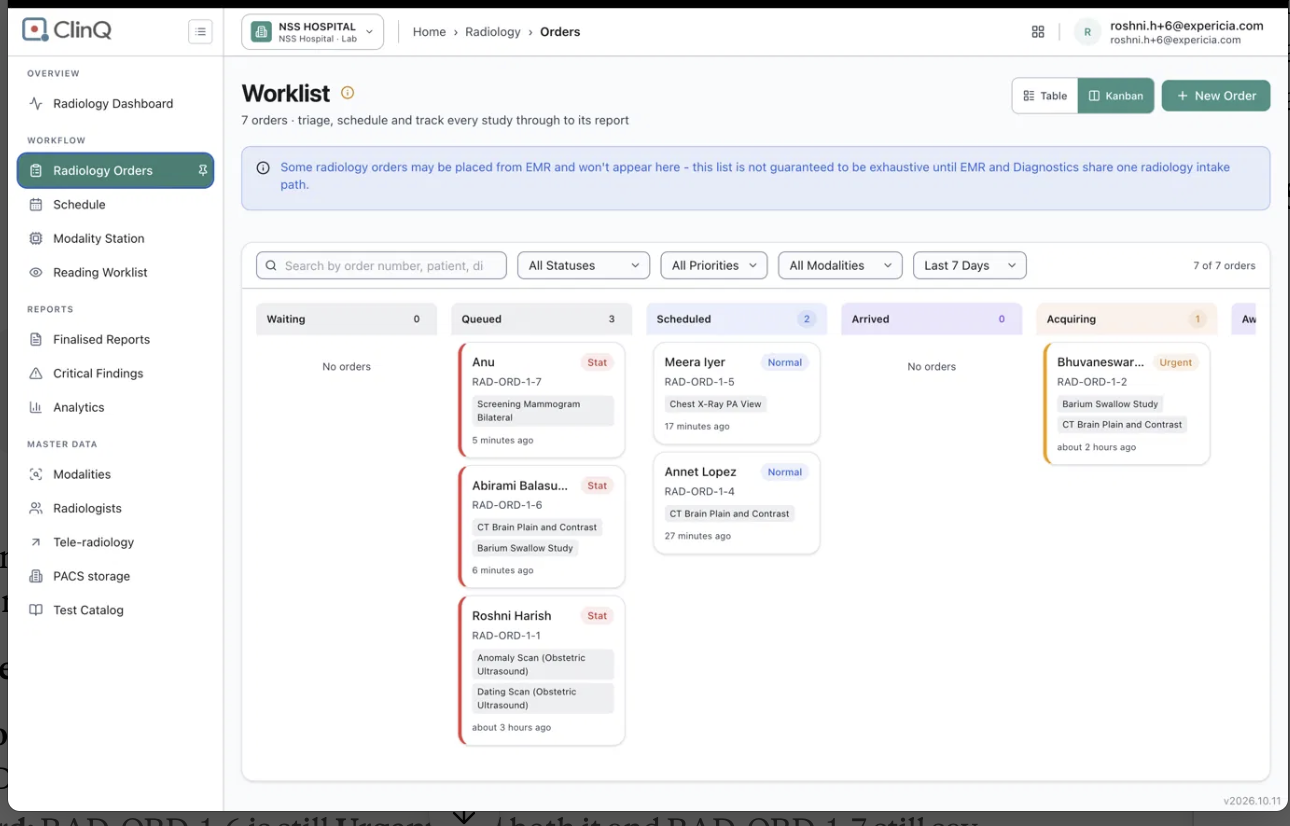
Radiology Orders board:
Order Patient Priority Status Age shown
RAD-ORD-1-6 Abirami Balasubramaniam Stat Queued 28 minutes
RAD-ORD-1-1 Roshni Harish Stat Queued about 3 hours
RAD-ORD-1-5 Meera Iyer Normal Scheduled 39 minutes
RAD-ORD-1-4 Annet Lopez Normal Scheduled about 1 hour
RAD-ORD-1-7 Anu Stat Acquiring 27 minutes
RAD-ORD-1-2 Bhuvaneswari Dhandapani Urgent Acquiring about 3 hours
RAD-ORD-1-3 Rashmi Normal Reported about 2 hours
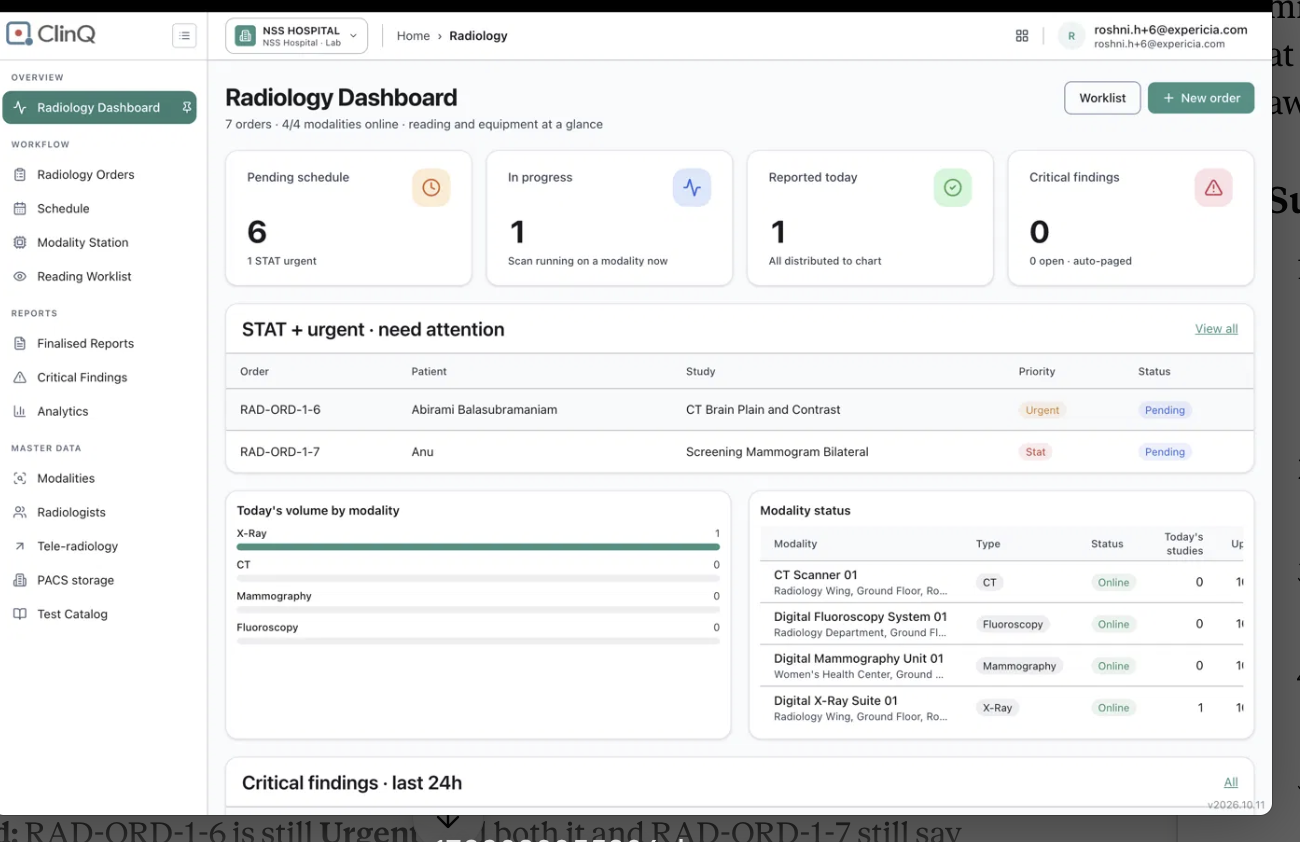
Dashboard "STAT + urgent · need attention" list:
Order Priority shown Status shown
RAD-ORD-1-6 Urgent Pending
RAD-ORD-1-7 Stat Pending
Dashboard cards: Pending schedule 6 ("1 STAT urgent"), In progress 2, Reported today 1, Critical findings 0.
Differences found
Wrong priority: RAD-ORD-1-6 is Stat on the board (changed from Urgent when it was moved from Waiting to Queued) but is still Urgent on the dashboard, even after a fresh load.
Wrong status: RAD-ORD-1-6 is Queued and RAD-ORD-1-7 is Acquiring, but both show "Pending" on the dashboard. "Pending" is not a status used on the board.
Open Stat order missing: RAD-ORD-1-1 (Stat, Queued, about 3 hours old) is not in the list.
Open Urgent order missing: RAD-ORD-1-2 (Urgent, Acquiring, about 3 hours old) is not in the list.
Card count: "Pending schedule" says 6 with "1 STAT urgent". The board has 3 open Stat orders (RAD-ORD-1-6, RAD-ORD-1-1, RAD-ORD-1-7) and 1 open Urgent order. The 6 equals Queued 2 + Scheduled 2 + Acquiring 2, so it seems to count every open order, including the 2 that are Acquiring, which the "In progress" card also counts (2). The card is named "Pending schedule", but 4 of the 6 orders are already scheduled or being scanned.
Age on the board: the age on each board card looks like time since the order was created, not time in the current status. For example, RAD-ORD-1-2 shows "about 3 hours", but it is not shown how long it has been in Acquiring.
Second live check (about 14:30, after RAD-ORD-1-7 moved to Awaiting report)
Orders board: RAD-ORD-1-7 (Stat) is in Awaiting report. RAD-ORD-1-2 (Urgent) is the only order in Acquiring.
Dashboard cards updated: In progress changed from 2 to 1, and Today's volume for Mammography changed from 0 to 1.
Dashboard list did not update: it still shows RAD-ORD-1-7 as Stat with status "Pending", and RAD-ORD-1-6 as Urgent with status "Pending". So the cards follow the live data, and the "need attention" list does not.
Pending schedule: it is still 6 with "1 STAT urgent". The 6 equals every open order (Queued 2, Scheduled 2, Acquiring 1, Awaiting report 1), so it now also counts an order that is waiting for a report, which is not "pending schedule".
Reading Worklist: the same order appears there with status "Acquired", radiologist "Unassigned" and "Resulted Oct 19, 2026 08:56:48". The status name differs again (Acquired here, Awaiting report on the board, Pending on the dashboard). The time 08:56:48 looks like UTC, because the order moved to Awaiting report at about 14:26 local time (IST). The page shows no time zone. This was not confirmed.
Expected
The dashboard list uses the same current priority and status as the Orders board, without needing a manual refresh.
The list shows every Stat and Urgent order that is not Reported or Cancelled, in these statuses: Waiting, Queued, Scheduled, Arrived, Acquiring, Awaiting report, and the exception statuses (Postponed, Interrupted, No-show, Rescheduling).
Columns: Order, Patient, Study, Priority, Status (same names as the board), Time in this status, and Machine or Radiologist when known.
Sort by priority (Stat, then Urgent), then by longest time in the current status.
An order is highlighted when its time in the current status goes past a limit that the hospital sets for that status and priority. Suggested starting values, to be agreed with the clinical team:
Waiting or Queued (not yet scheduled): Stat 15 minutes, Urgent 60 minutes
Scheduled or Arrived (scan not started): Stat 15 minutes, Urgent 30 minutes past the slot time
Acquiring: 60 minutes (to catch a scan that was started and not completed)
Awaiting report: Stat 30 minutes, Urgent 2 hours
Exception statuses: always shown
A Stat or Urgent order that is Acquiring and within its limit is shown without highlight, or can be hidden by a filter, since it is already being handled.
The card counts use clear rules, shown in a tooltip. "Pending schedule" counts only orders not yet scheduled. "In progress" counts Acquiring. "STAT urgent" counts all open Stat and Urgent orders.
The board and dashboard show "time in current status". If only the order age is available, label it "Order age".
Actual
The list shows 2 orders, with an old priority for one and a status that does not exist on the board for both.
Two open orders that are 3 hours old and urgent are missing.
No time in status is shown.
The card counts do not follow a clear rule.
Not checked
Why the dashboard shows different values. I only saw the result: it still showed the old priority and status after a fresh load, so it may read from a different source than the board, or hold a saved copy. The cause is not known.
Whether the order itself (when opened) shows Stat or Urgent. The board and the dashboard disagree, and I did not open the order.
Whether the dashboard updates after waiting longer, or on a later refresh.
Awaiting report and exception statuses: no Stat or Urgent order was in them, so how they would appear is not seen.
Whether the same difference appears for the admin role, and on the VVMC test site.
What waiting times the clinical team treats as late.
Why it matters
Stat and Urgent studies are the ones where delay matters most. If the dashboard shows a lower priority than the true one, and leaves out a Stat order that has waited about 3 hours, staff using it to decide what to do next can miss the most urgent patient. A priority raised at triage should reach every screen straight away.
Suggested fix
Make the dashboard read the same current order data as the Orders board (priority and status), and update when an order changes.
Use the board's status names on the dashboard.
Include all open Stat and Urgent orders in the list, as described above.
Add "Time in this status" and highlight orders past the hospital's limits.
Define the card counts clearly, so that "Pending schedule" means orders waiting to be scheduled.
Show "time in current status" on the board cards, not only the order age.
Priority
High (a raised priority and open Stat orders are not correctly shown on the screen staff use to decide what to do first)
Files