Bug #443
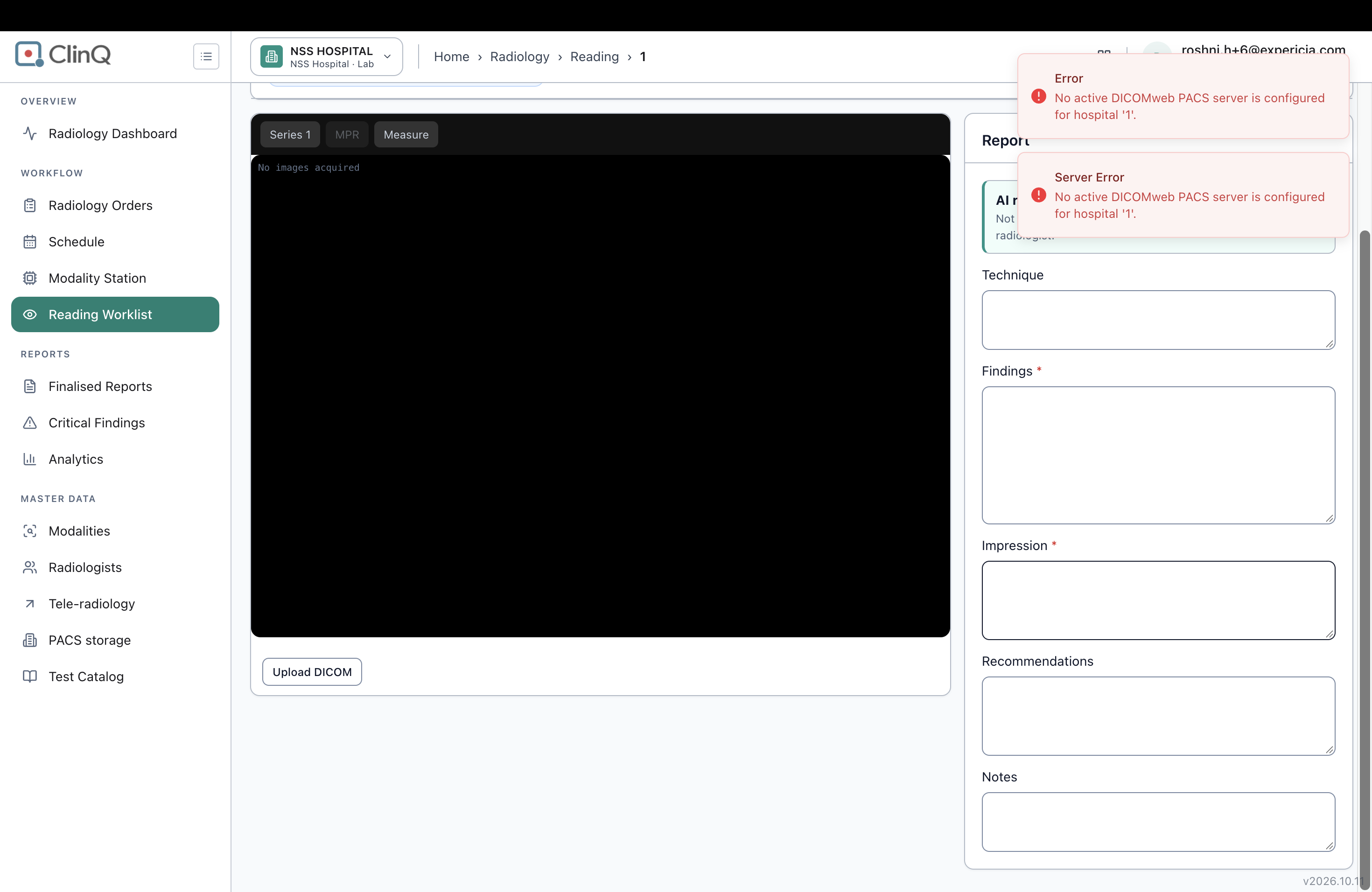
openRadiology Reading cockpit: "Upload DICOM" fails with "No active DICOMweb PACS server is configured for hospital '1'", shown as two error messages, with no guidance
0%
Description
In the Reading cockpit, clicking Upload DICOM shows two red error messages saying that no active DICOMweb PACS server is configured for hospital '1'. The cause looks like a missing configuration (no active PACS server for this hospital), but the screen does not say so in a way the user can act on. The same message appears twice (as "Error" and as "Server Error"), it shows the raw hospital id ('1') instead of the hospital name, and it does not say who should fix it or where. The viewer next to it says only "No images acquired".
Details
Environment: https://nssh.demo.clinq.health (NSS Hospital demo, build v2026.10.11), from the screenshot
Module: Diagnostics > Radiology > Reading Worklist > Reading cockpit (address /diagnostics/radiology/reading/1)
Logged in as: roshni.h+6@expericia.com (Radiologist role)
Reported by: Roshni Harish
Date: 19 Oct 2026
Steps to reproduce
Sign in as the radiologist and open the Reading cockpit for an order.
In the image panel (it says "No images acquired"), click Upload DICOM.
Choose a file.
Expected
If no PACS server is configured, the page should say so in plain words, for example "Image storage (PACS) is not set up for NSS Hospital. Ask an administrator to set it up under Radiology > PACS storage."
One message, not two.
The Upload DICOM button should be disabled, with a hint, when no PACS server is active.
The viewer should explain why there are no images ("No PACS server configured") instead of only "No images acquired".
Actual
Two red messages appear at the same time:
"Error: No active DICOMweb PACS server is configured for hospital '1'."
"Server Error: No active DICOMweb PACS server is configured for hospital '1'."
The hospital is shown as '1' (an internal id).
No next step is given. The viewer still says only "No images acquired".
The Upload DICOM button is shown as available.
Also noticed
The report form on the same page (Technique, Findings, Impression, Recommendations, Notes) opens normally, and there is no "Access denied" for this radiologist. This is relevant to Redmine #302.
The AI report assist panel says "Not yet enabled for this tenant", which is clear.
Not checked
Whether a PACS server exists under Radiology > PACS storage on this site, and whether it is inactive or missing.
Whether the error is the same for the admin, and whether it also happens on the VVMC test site.
Which file types and sizes the upload accepts, because the upload did not get past the error.
Whether a report can still be saved and finalised without images.
Why it matters
Image upload, viewing and the PACS connection are a core part of the radiology workflow. Staff who see a technical error with an internal id, shown twice, do not know that this is a set-up issue or who can fix it. They may retry, raise support tickets or assume the system is broken. It also blocks testing of the image and PACS integration for this site before go-live.
Suggested fix
Show one clear message in plain language, naming the hospital and the place to fix it.
Disable Upload DICOM, with a hint, when no PACS server is active.
Replace "No images acquired" with a reason when the cause is a missing PACS configuration.
Add a set-up check (admin checklist or banner) that warns when a hospital has no active PACS server before radiology goes live.
Make sure only one toast is raised per failed request.
Priority
Medium (High if this configuration is also missing on the production site)
Files
S- Updated by SK - 12 days ago
- Resolved By set to SK -
Partial fix, merged to dev on nuvita-diagnostics (cada88b8). I'm not the ticket's assignee (Alminta) - picking up the part I could fix cleanly, leaving the rest for them/you to scope since it needs either live reproduction or new API design, not guessing.
Fixed: the raw "...for hospital '1'." message is gone. RadiologyPacsController now resolves the hospital's name via IAdminServiceContract (already wired for this host) and rewrites the message as "Image storage (PACS) is not set up for . Ask an administrator to set it up under Radiology > PACS storage." - best-effort: if Admin is unreachable it falls back to a generic "this hospital" phrase rather than ever showing the raw id or failing the request. 4039 backend tests pass, coverage gate passes (95.1%, floor 85%).
Not fixed here, flagged instead of guessed at:
- "Same message shown twice, as Error and Server Error": I traced the full axios error-interceptor chain in the portal and couldn't find a path that shows two toasts for one failed 5xx request - the >=500 branch returns immediately after its one toast. This may have already stopped reproducing, or needs a live repro against the actual deployed build (the ticket's screenshot is from v2026.10.11) to find the real second source before touching interceptor code blind.
- Pre-emptively disabling "Upload DICOM" (with a hint) and the viewer saying "No PACS server configured" instead of "No images acquired": both need a new proactive "is PACS configured" check the frontend can call before upload is attempted - today it only finds out when an action against PACS actually fails. That's new API surface (and a permissions question - a Radiologist likely can't call the existing admin-facing PACS-servers listing endpoint), so I'm leaving it for a scoped follow-up rather than building it unreviewed.
QA change-log updated with what's fixed and what's still open. Leaving assigned to Alminta since the ticket's still open on the remaining items - let me know if you want those scoped as their own ticket.
AV Updated by Alminta V. 1 day ago
- Status changed from New to Resolved
- Assignee changed from Alminta V. to Roshni Harish.