Bug #442
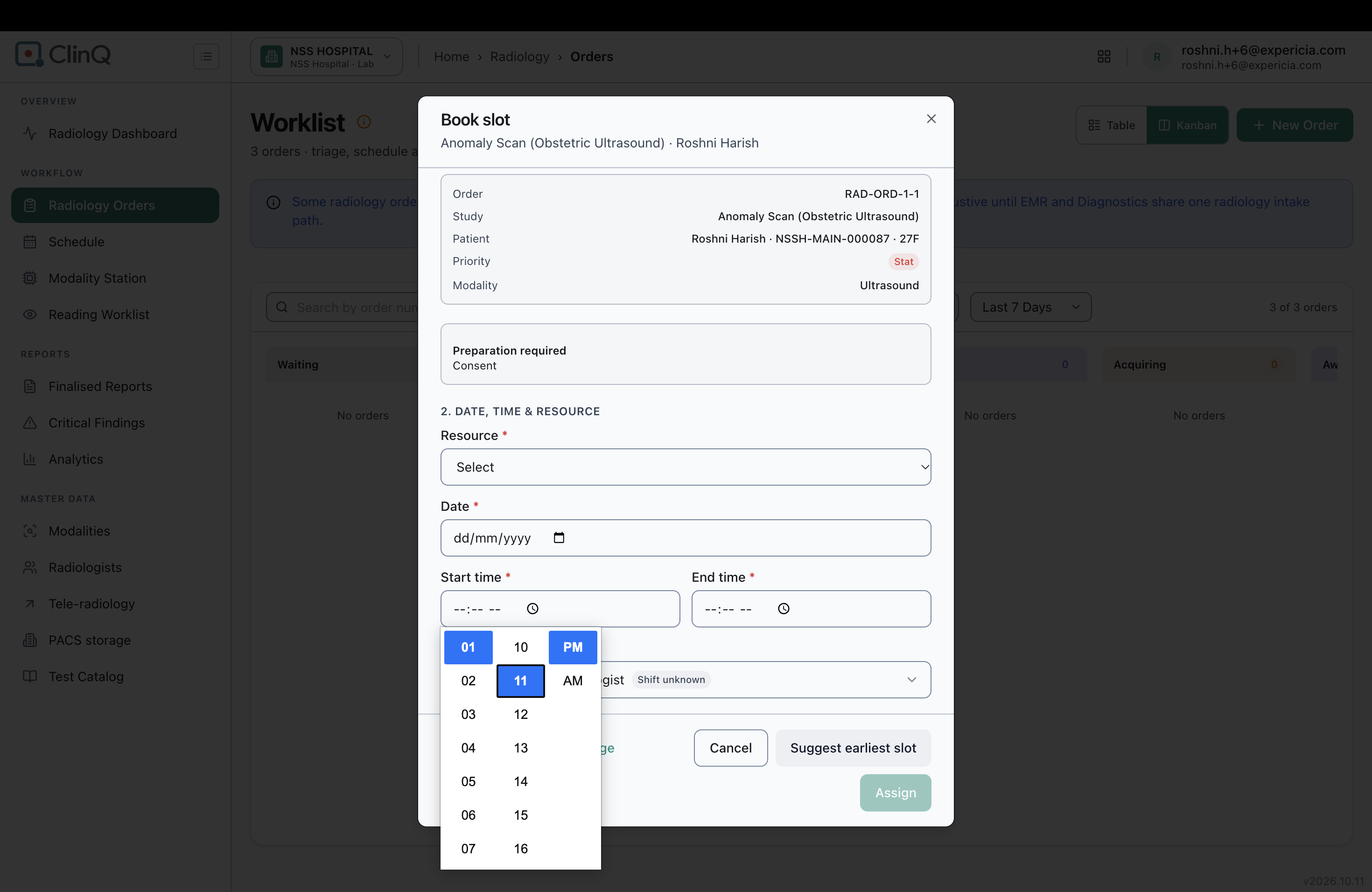
closedRadiology Schedule: in "Book slot", the Start and End time cannot be set until a date is chosen, and nothing tells the user why
0%
Description
Description
In the Book slot dialog, if the user tries to set the Start time or End time before choosing a date, the time cannot be selected. There is no message, hint or visual change saying that the date is needed first. The Assign button stays greyed out without saying which fields are missing. A user can get stuck on this form and not know what to do.
Details
Environment: https://nssh.demo.clinq.health (NSS Hospital demo, build v2026.10.11), from the screenshot
Module: Diagnostics > Radiology > Schedule > Book slot
Logged in as: roshni.h+6@expericia.com (Radiologist role), as shown in the screenshot before this one. The booking was tried while signed in as this user.
Reported by: Roshni Harish
Date: 19 Oct 2026
Steps to reproduce
Open Radiology > Schedule.
Click Schedule new study (or a free slot) to open the Book slot dialog.
Under "1. Pick a study", choose a study (for example RAD-ORD-1-3, Chest X-Ray PA View). Resource shows Digital X-Ray Suite 01.
Leave Date empty (it shows dd/mm/yyyy).
Click Start time and try to pick a time.
Expected
The time fields should either be usable on their own, or they should be disabled with a short hint such as "Select a date first".
Assign should say which required fields are missing.
Actual
The time picker opens, but the time cannot be selected while the date is empty.
There is no message, no hint and no error on the date field.
Assign stays greyed out with no explanation.
Also noticed
When the slot was opened from a time on the grid (09:00 to 09:30, 19 Oct), the date and time were filled in. They showed the red message "This time has already passed — choose a future date and time", and Assign stayed disabled. The message is clear, but the slot grid still allowed clicking a past time. Past slots could be greyed out on the grid.
The Technician field shows "Shift unknown" next to the name (for example Nikhil Maheswar, Radiologist). It is not clear what it means or where to fix it. It did not appear to block booking.
For an order in the Waiting status, a CT study had no CT machine to choose, and the list of studies in this dialog was empty when no order was ready to schedule. The empty list said only "No matching unscheduled studies".
Not checked
Whether the time picker works with the keyboard (typing the time) when the date is empty.
Whether the same happens for the admin role or on other browsers.
Whether the same behaviour exists on the VVMC test site.
What exactly "Shift unknown" depends on (HR roster or the radiologist record).
Why it matters
Staff booking scans can get stuck on a form that gives no clue about what is missing. This wastes time at the front desk and may lead to staff abandoning the booking or calling support.
Suggested fix
Default the date to today, or disable the time fields with the hint "Select a date first".
Mark the date field clearly (red outline and message) when a required field is empty.
Show a short line next to Assign naming the missing fields, for example "Select a date and a start and end time".
Grey out past slots on the schedule grid.
Explain "Shift unknown" with a tooltip, or hide it if shifts are not used.
Show a clearer empty state in the study list, such as "No studies are ready to schedule. Create a new order or check its status".
Priority
Low to Medium
Files