Bug #296
closedRadiology orders do not create a bill: Billing → Bills shows no Radiology bills for the orders placed
0%
Description
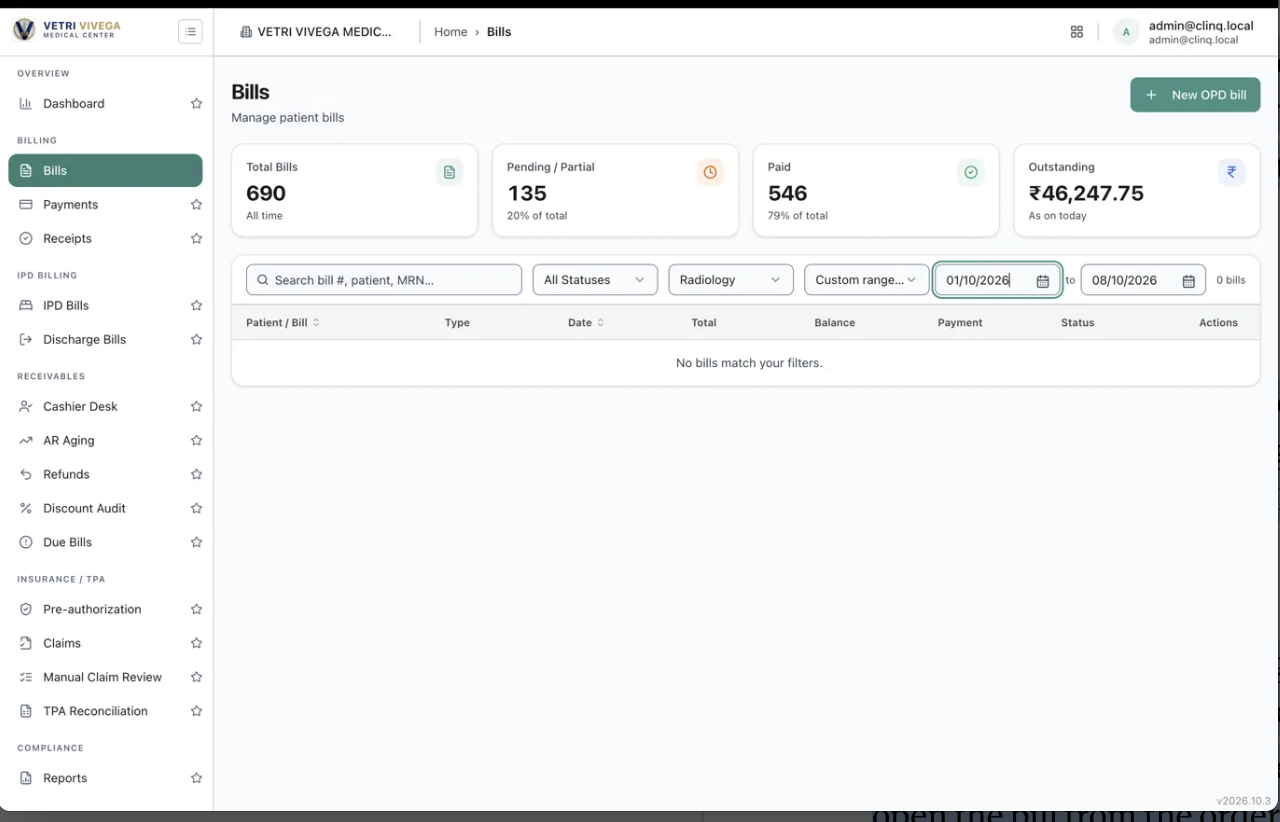
When a radiology order is placed, no bill for it appears in Billing → Bills. With the filter Type = Radiology and dates 01/10/2026 to 08/10/2026, the list is empty ("0 bills", "No bills match your filters"), but the Radiology Worklist has 12 orders in that period. Lab and OPD orders do create bills in the same list, so radiology work is being done without being billed, or billed somewhere the Bills page doesn't show.
Environment: https://vvmc.test.clinq.health (Vetri Vivega Medical Center, test tenant), build v2026.10.3 Module: Diagnostics → Radiology (orders) and Billing → Bills Example orders: RAD-ORD-1-9 (Arathi, CT Chest, placed 24 minutes before the screenshot) and RAD-ORD-1-11 (amal, Chest X-Ray PA View, placed 4 minutes before it) Logged in as: admin@clinq.local Reported by: Roshni Harish (roshni.h@expericia.com) Date: 8 Oct 2026
Steps to reproduce
Open Radiology → New Order and place an order for any patient and test (for example CT Chest). Note the order number (here RAD-ORD-1-11).
Open Radiology → Worklist and confirm the order is there, in Waiting.
Open Billing → Bills.
Set the type filter to Radiology and the date to Custom range (01/10/2026 to 08/10/2026). Also try searching by the patient's name or MRN.
Expected result
A bill for the radiology order is created (or a pending bill is created at the point the hospital's rules say, for example at order, at scan or at report), and it appears in Bills under type Radiology, with the right patient, test and amount, and a status such as Pending or Finalized.
Actual result
The Bills list shows 0 bills and "No bills match your filters." The Worklist shows 12 of 12 orders for the same period.
Also noticed
The Bills page does have a Radiology type filter, and the bills I could see earlier were of type Lab and OPD. So Radiology bills are expected to exist.
The Total Bills card went from 682 to 690 between two screenshots today, so bills are still being created for something. I can't tell from the screenshots which types they are.
Not checked
Whether the bill is meant to be created at order time, at scan or at report. If billing is meant to happen later (for example at Intake or after the report is finalised), the Radiology bills may not exist yet. I did not take an order through every step.
Whether radiology bills are filed under another type (for example OPD or Lab), or in another place (Cashier Desk, Due Bills, IPD Bills).
Whether the filter is wrong: I did not check Radiology with All dates, or search by order number.
Whether it happens for orders placed from OPD consultation as well as from the Radiology New Order screen. I didn't check.
Whether the test price is set in the Test Catalog. A test with no price may not create a bill.
Why it matters
Scans are being booked and performed with no bill, so the hospital can't collect for them. It also means the Billing dashboards, outstanding amounts and daily collection reports leave out radiology revenue.
Suggested fix
Create the bill (or a pending bill line) when the order is placed, or at a clearly defined step, and show it under type Radiology.
Show the bill number on the order, in the Worklist dialog, so staff can open the bill from the order.
If billing is deliberately done later (for example at Intake), show "Bill not generated yet" on the order and say at which step it will be.
Add a check that every completed scan has a bill.
Priority
High. Radiology work may not be billed, which is a direct revenue and reporting problem. If billing is designed to happen at a later step, this drops to Medium (an enhancement to show the billing status on the order).
Files