Bug #283
closedRadiology Worklist: an order placed from an OPD consultation opens an incomplete dialog with no triage section for about 5 minutes
0%
Description
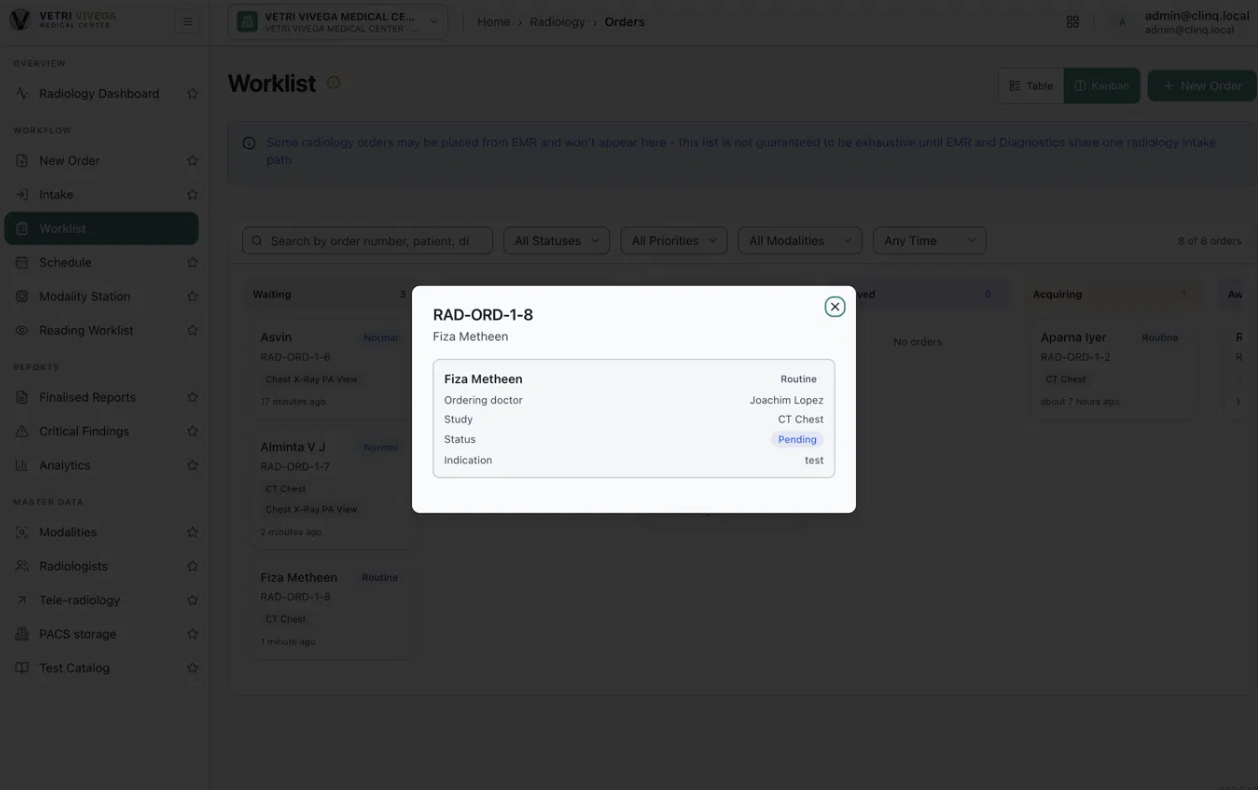
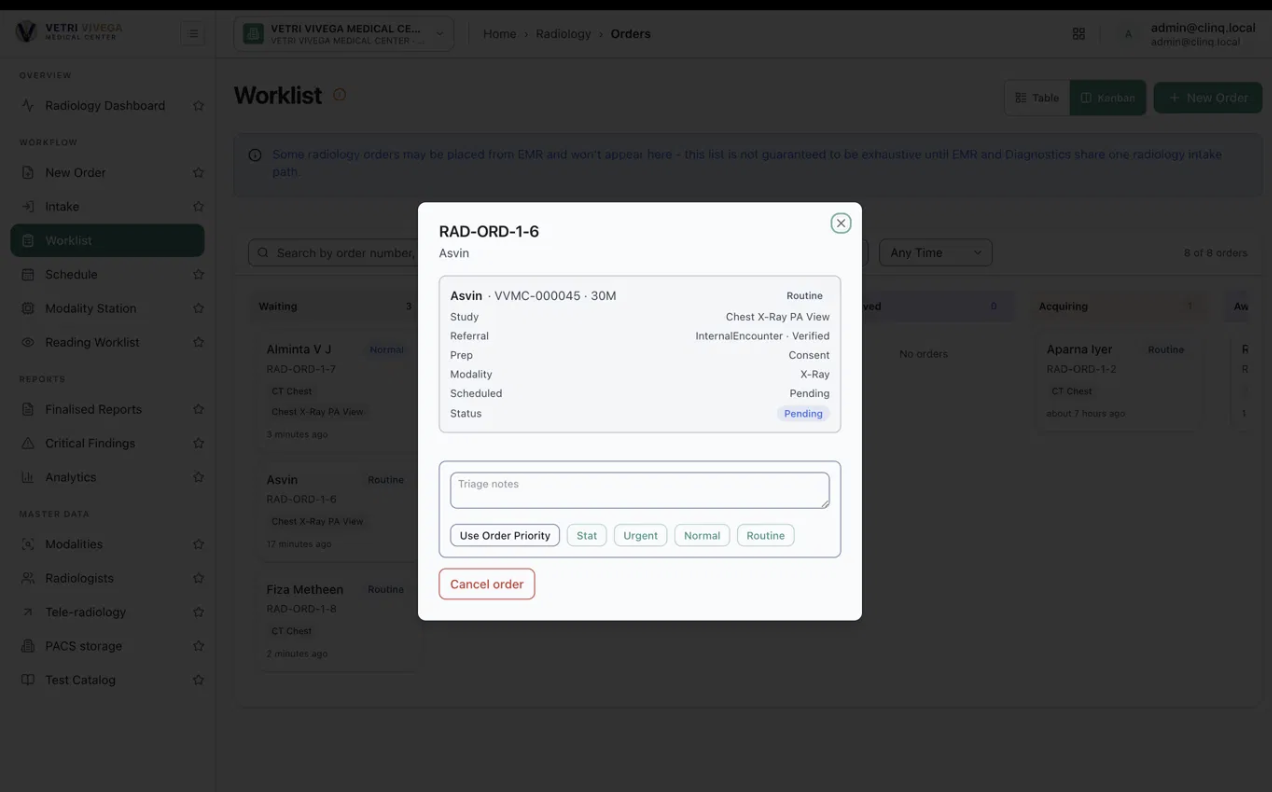
When a radiology order is placed from an OPD consultation, it appears in Waiting in the Worklist. For about 5 minutes after that, opening the order shows a short dialog with only a few details and no Triage section (no triage notes box and no priority buttons). After about 5 minutes the same order, with the same status, shows the full dialog: patient ID and age, referral, prep, modality, scheduled status, and the Triage notes box with the Use Order Priority / Stat / Urgent / Normal / Routine buttons. Until the full dialog appears, the order can't be triaged and can't move on to Queued, so it is a blocker.
Environment: https://vvmc.test.clinq.health (Vetri Vivega Medical Center, test tenant), build v2026.10.3 Module: Diagnostics → Radiology → Worklist (order dialog), orders placed from OPD Example order: RAD-ORD-1-8, CT Chest, Fiza Metheen (VVMC-000051, 22F), ordering doctor Joachim Lopez, Pending Logged in as: admin@clinq.local Reported by: Roshni Harish (roshni.h@expericia.com) Date: 7 Oct 2026
Steps to reproduce
As a doctor, place a radiology order (for example CT Chest) from an OPD consultation.
Open Radiology → Worklist (Kanban). The new order is in Waiting.
Click the order card straight away and look at the dialog.
Close it, wait about 5 minutes, and open the same card again.
Expected result
The dialog is complete from the moment the order appears: patient details, referral, prep, modality and the Triage section, so the order can be triaged and queued immediately. If some details really aren't ready, the dialog says so ("Referral being verified, triage available shortly") and doesn't just hide the Triage section.
Actual result
First minutes (screenshot 1): the dialog shows only the patient name (Fiza Metheen), priority (Routine), ordering doctor, study, status (Pending) and indication ("test"). It is missing the patient ID and age, referral, prep, modality and scheduled lines. There is no triage section and no action button at all, and no message explaining why.
After about 5 minutes (screenshot 2): the same order shows all those lines, plus the Triage notes box and the priority buttons.
Why it matters
Triage is the first step of the radiology workflow. With nothing to click, the technician can't do anything with a new order for about 5 minutes and doesn't know why. For a STAT or urgent order from OPD this delay is unsafe.
Suggested fix
Show the Triage section as soon as the order is in Waiting, or at least show a clear "not ready yet" message with the reason.
Load the full order details together with the card, or refresh the dialog automatically when they become available.
If a background step is required, show its status (for example "Referral verification pending") and let urgent orders skip the wait.
Priority
High. New OPD orders can't be triaged for about 5 minutes, and nothing explains why. The impact is greatest on STAT and urgent orders.
Files
AV Updated by Alminta V. about 1 month ago
- Status changed from New to Resolved
- Assignee changed from Alminta V. to Roshni Harish.
- Resolved By set to Alminta V.
RH Updated by Roshni Harish. 25 days ago
- Status changed from Resolved to Closed