Bug #281
closedRadiology Worklist: clicking "Complete Scan" opens a 404 Not Found page
0%
Description
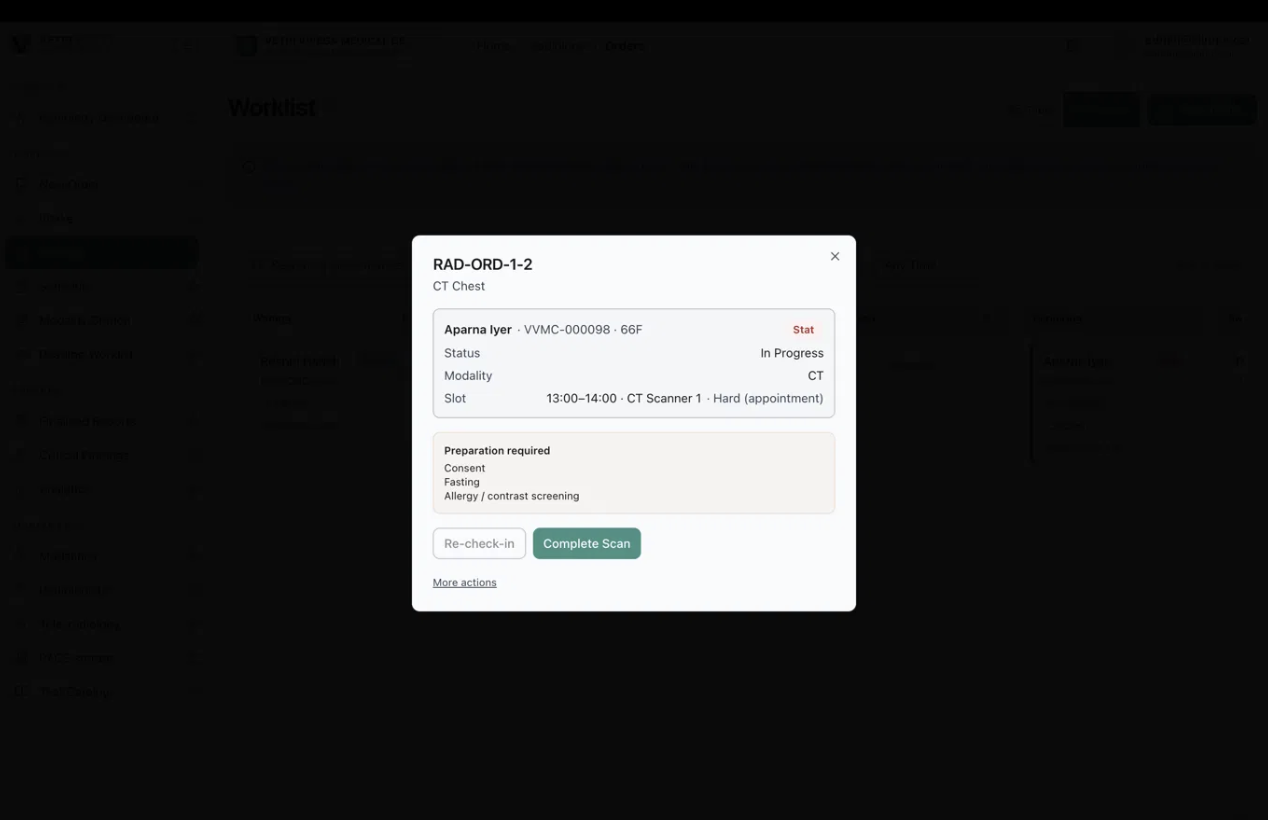
In Radiology → Worklist, opening an order that is in progress shows a dialog with Re-check-in and Complete Scan buttons. Clicking Complete Scan takes the user to a "404 Not Found" page instead of completing the scan. The scan cannot be completed from this dialog, so the order can't move on to reporting.
Environment: https://vvmc.test.clinq.health (Vetri Vivega Medical Center, test tenant), build v2026.10.3 Module: Diagnostics → Radiology → Worklist (order dialog) Example order: RAD-ORD-1-2, CT Chest, Aparna Iyer (VVMC-000098, 66F), Status In Progress, slot 13:00–14:00 on CT Scanner 1 Logged in as: admin@clinq.local Reported by: Roshni Harish (roshni.h@expericia.com) Date: 7 Oct 2026
Steps to reproduce
Open Radiology → Worklist (Kanban view).
Click the order card RAD-ORD-1-2 (Aparna Iyer) in the Acquiring column.
In the dialog (Status: In Progress, with "Preparation required: Consent, Fasting, Allergy / contrast screening"), click Complete Scan.
Expected result
The scan is marked complete, the order moves to Awaiting report, and the user stays on the Worklist (or is taken to the next step).
Actual result
The browser opens a 404 Not Found page. The order is not shown as completed.
Not checked
The web address of the 404 page (the report would be easier to fix with it).
Whether the order status changed behind the scenes despite the error. I did not click the button myself, because it would change the status of the test order.
Whether the other buttons in the dialog (Re-check-in and More actions) work.
Whether the scan can be completed another way (for example from Modality Station).
Also noticed
The card on the Worklist shows RAD-ORD-1-2 as Routine, but the dialog shows Stat. If the priority was not changed between the two screenshots, the Worklist card and the dialog disagree.
Why it matters
Completing the scan is the step between taking the images and reporting them. If it fails, the order is stuck in Acquiring, and nothing reaches the radiologist's reading worklist.
Priority
High. A main step in the radiology workflow fails with an error page, and no workaround is known.
Files