Bug #744
closedPrescription Print: Empty Sections and Heavy, Boxed Layout Need a Visual Design Overhaul
0%
Description
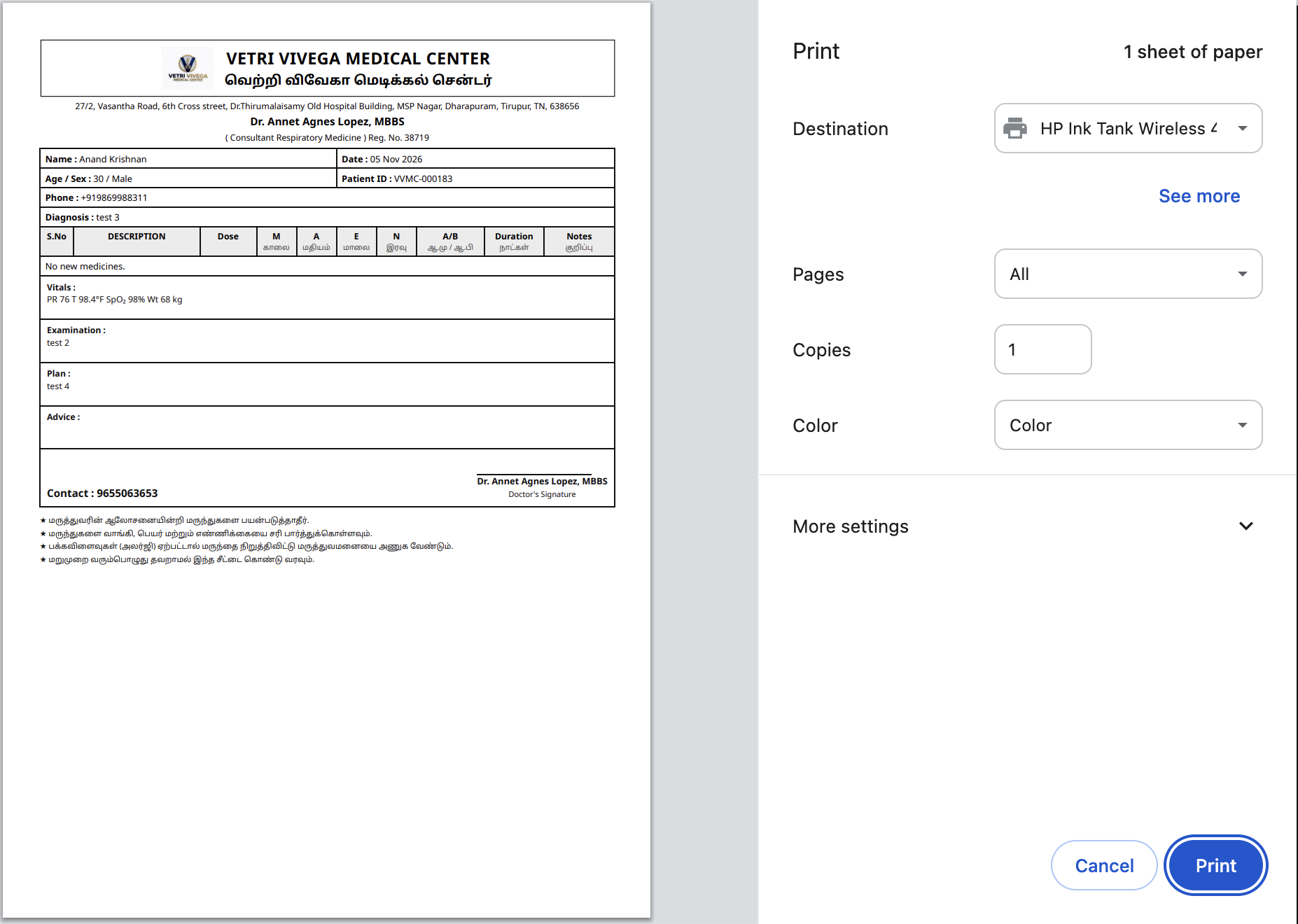
The prescription print has two related problems. First, several sections print placeholder/blank content instead of being omitted: Medications shows its full table header plus a “No new medicines.” line when nothing was prescribed, instead of being left out entirely (the print should go straight from Diagnosis to Examination to Plan); and the “Advice:” box prints as an empty bordered section whenever nothing was entered — both should disappear from the print when there’s nothing to show, with Advice needing a quick confirmation first in case the blank box is deliberately left for the doctor to handwrite on. Vitals (PR, Temp, SpO2, Weight) also always prints regardless of relevance; recommendation is not to print it by default, since it’s clinical-record data the patient/pharmacist doesn’t act on, except for Weight when it’s the basis for a weight-based dose on that same prescription (e.g. pediatrics), where it should still print as dose justification. Second, independent of all that, the overall visual design is dated and hard to scan: every field — Name, Date, Age/Sex, Patient ID, Phone, Diagnosis, each medication table column, Vitals, Examination, Plan, Advice — sits inside its own heavy black-bordered box stacked top to bottom, so the page reads like a filled-out form rather than a prescription, with no visual hierarchy between patient info, clinical notes, and the medication table.
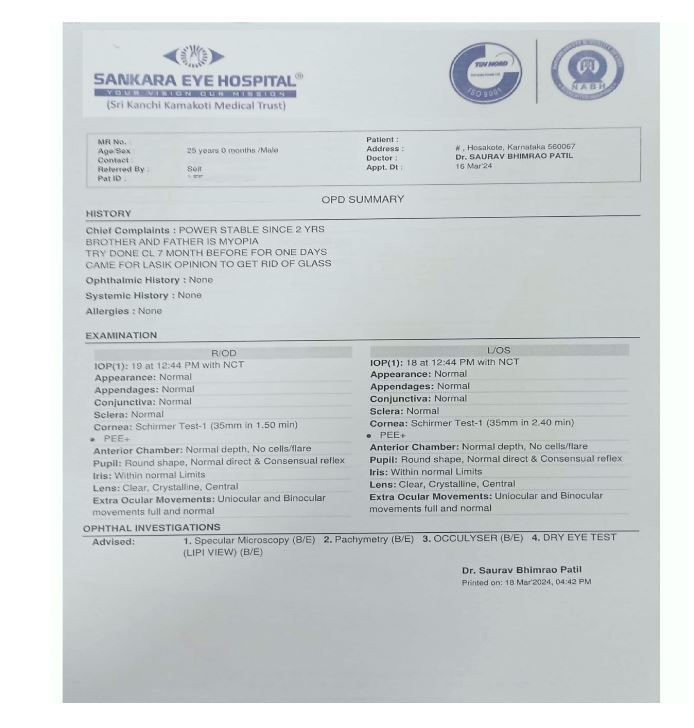
A third gap, separate from both of the above: the print is also missing two fields that a comparable OPD summary print includes — Chief Complaint and Allergies. Neither appears anywhere on this prescription print today. A reference example (Sankara Eye Hospital’s OPD Summary print, shared for comparison) shows both under a “History” section — Chief Complaints as free text, and Allergies explicitly stated even when there are none (“Allergies: None”) rather than left out. Both should be added to this print the same way.
Environment
Example print: Vetri Vivega Medical Center, Patient ID VVMC-000183, Anand Krishnan (30/Male), Dr. Annet Agnes Lopez (Consultant Respiratory Medicine), 05 Nov 2026. Diagnosis “test 3”, Examination “test 2”, Plan “test 4”, Vitals “PR 76 T 98.4°F SpO2 98% Wt 68 kg”. No medicines prescribed (Medications table prints header + “No new medicines.” only) and Advice left blank (empty bordered box still prints). For layout comparison: this hospital’s own Laboratory Tax Invoice and Dispensary payment receipt (reviewed earlier in this engagement) use a colored header accent, a compact patient-info card, and light dividers instead of full borders around every field — a design language the prescription print doesn’t follow.
Reference example for the desired content and look: Sankara Eye Hospital’s OPD Summary print. It includes a “History” section with Chief Complaints, Ophthalmic History, Systemic History, and Allergies; a compact two-column patient-info header (MRO No./Age-Sex/Contact/Referred By/Pat ID on one side, Patient/Address/Doctor/Appt Dt on the other); bold section labels with thin dividers instead of boxes around every field; and a side-by-side Examination section (R/OD vs L/OS) for comparable values — shared as the target for both the missing fields and the overall layout.
Observed Behavior / Steps to Reproduce
Complete a consultation with Diagnosis, Examination, Plan, and Vitals recorded, but prescribe no medicines and leave Advice blank.
Generate/print the prescription.
Medications: the full table header prints with “No new medicines.” as the only content underneath — no actual rows.
Advice: an empty bordered “Advice:” box prints with nothing inside it.
Vitals: the Vitals section prints (PR, T, SpO2, Wt) on every print where it was recorded, regardless of relevance.
Overall layout: every field above — filled or not — prints inside its own heavy bordered box, and the medication table’s 9 narrow, partly Tamil-labeled columns look cramped even when they do have content, giving the whole page a boxy, form-like appearance.
Chief Complaint and Allergies: look for either field anywhere on the print — neither is shown, even though Chief Complaint is captured at registration/triage and Allergies is recorded on the patient’s chart elsewhere in the system.
Expected Result
Medications and Advice should both disappear from the print entirely when there’s nothing to show — no table header, no “No new medicines” placeholder line, no empty bordered box — so the print goes directly from one filled section to the next. Vitals should not print by default, except for Weight when the prescribed dose is weight-based, where it should print alongside the medicine it justifies. Beyond content, the layout itself should move away from a full bordered box around every single field: group patient header info (Name, Age/Sex, Patient ID, Phone) into one compact block, let Diagnosis/Examination/Plan/Advice flow as labeled text sections with light dividers instead of full boxes, and let the medication table’s columns adapt to content instead of reserving fixed narrow columns for every field — similar to the cleaner header-accent/card style already used on this hospital’s own bills and receipts.
Chief Complaint, Allergies, and any other such clinical/history field on this print should follow one consistent rule: if it was not entered, print it as “None” (e.g. “Chief Complaint: None”, “Allergies: None”) rather than leaving it blank or omitting the field — so the reader can tell the field was checked and genuinely empty, not simply never asked.
Actual Result
The Medications table header and “No new medicines.” line always print even with nothing prescribed. The Advice box always prints as an empty bordered section even with nothing entered. The Vitals section always prints whenever vitals were recorded, with no option to leave it off a given printout. On top of that, every field on the page — whether it has content or not — is boxed in its own heavy black border, the clinic header crams English and Tamil names together in one more bordered box that pushes content further down the page, and the 9-column medication table (with Tamil subheadings) looks cramped and mostly empty on an ordinary prescription. Altogether the print reads like a filled-out form rather than a clean prescription, with no visual distinction between patient info, clinical notes, and the medication table.
Chief Complaint and Allergies are not shown anywhere on the print, even though Chief Complaint is already captured for the visit and Allergies exists elsewhere on the patient’s chart — a reader of the printed prescription (another doctor, a pharmacist, the patient themselves) has no way to see either from this document.
Notes
Everything from the earlier separate write-up is folded into this one report, per request: the three empty-section fixes (Medications, Advice, Vitals) and the general visual-design observation, since they all apply to the same print template. Medications is the clearest cut — omit entirely when nothing prescribed. Advice is very likely the same fix, but worth confirming first in case the blank box is deliberately left for the doctor to handwrite on. Vitals’ recommendation (don’t print by default, keep Weight only when it’s the basis for a weight-based dose) is a product/clinical call for the team to confirm, not a hard requirement like the other two. The overall layout/visual-design point is a design-review recommendation rather than a functional bug: replace the full-border-per-field approach with lighter dividers and whitespace, matching the design language already used on this hospital’s own Tax Invoice and Dispensary receipt.
Updated per a shared reference print (Sankara Eye Hospital’s OPD Summary) to add two more asks: include Chief Complaint and Allergies on the print, and use that reference as the concrete target for the layout rework described above — its two-column patient header, bold section labels with thin dividers instead of per-field boxes, and “None” stated explicitly for any empty clinical/history field rather than left blank. This “show None when nothing was entered” rule applies to Chief Complaint, Allergies, and any other such field on this section — it’s distinct from the earlier Medications/Advice/Vitals guidance, which is about omitting a whole section/table from the print when it has nothing in it, not about how an individual field within a section should read when empty.
Files
RH Updated by Roshni Harish. 8 days ago
RH Updated by Roshni Harish. 7 days ago
- Status changed from Resolved to Closed