Bug #484
closedSearch Box Placeholder Text Clipped on Radiology Orders Page
0%
Description
Summary
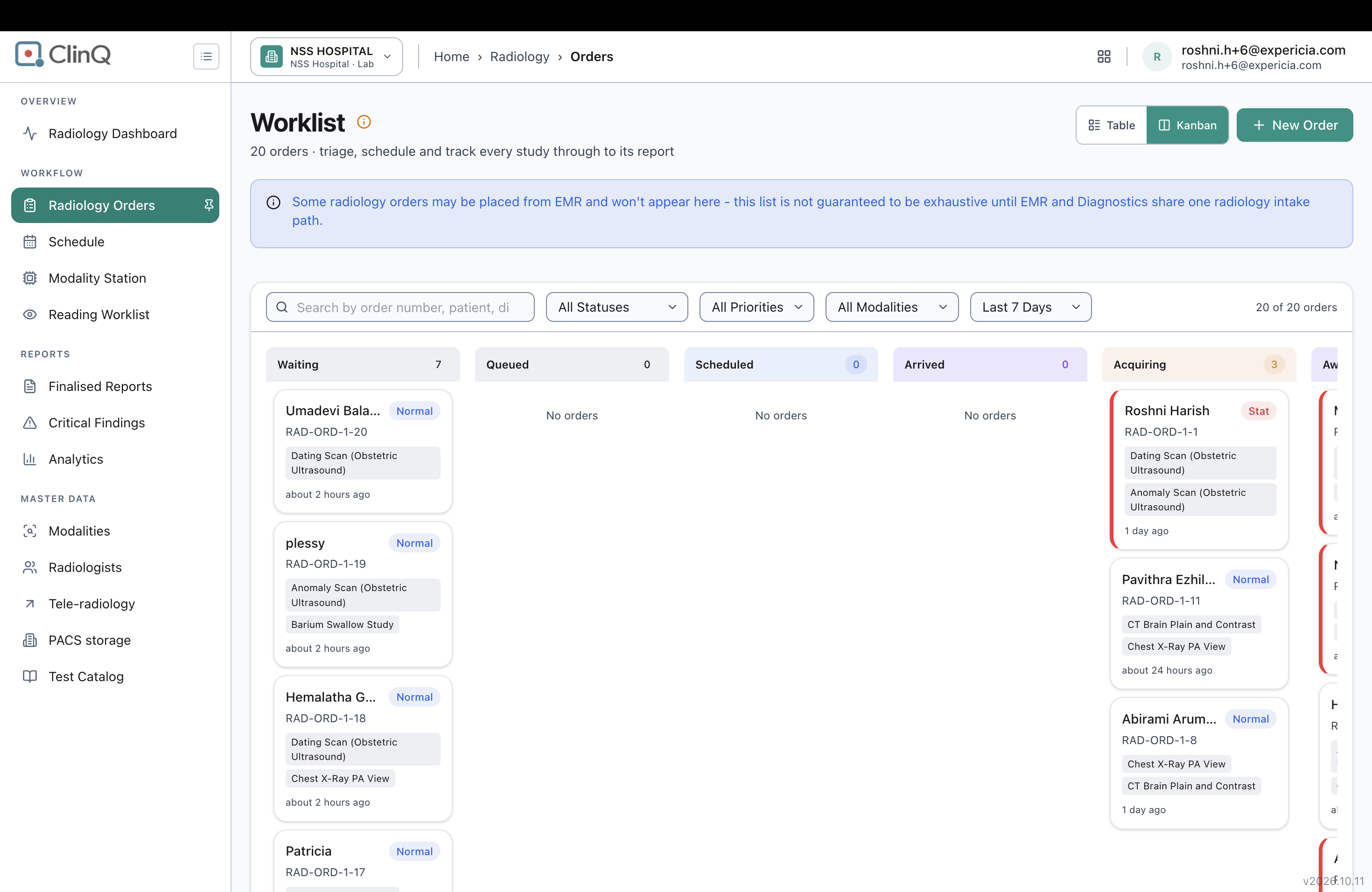
On the Radiology Orders worklist page, the search box's placeholder text is visually clipped mid-word ("Search by order number, patient, di") instead of showing in full ("Search by order number, patient, diagnosis..."), with no ellipsis or other indication that the text is cut off.
Impact
Low severity, cosmetic. Users can't tell from the placeholder alone that the search also covers diagnosis, since the text is cut off before that word is fully visible. It also just looks unpolished, with text abruptly stopping mid-word rather than wrapping or truncating gracefully.
Environment
Clinq HMS demo environment, NSS Hospital (nssh.demo.clinq.health), Radiology Orders worklist page (Kanban view), in a wide browser window where the search box shares a row with the Status, Priority, Modality, and Date Range filter dropdowns. Tested 20 October 2026.
Steps to Reproduce
- Go to Radiology > Radiology Orders (Kanban view).
- Look at the search box on the left of the filter row, above the status columns.
- Read the placeholder text shown inside it (with no text typed in).
Expected vs Actual
Expected: the full placeholder text "Search by order number, patient, diagnosis..." is visible, or if space is tight, it degrades gracefully (e.g. truncates with an ellipsis, or the search box gets more room).
Actual: the placeholder's underlying attribute value confirms the full text is "Search by order number, patient, diagnosis...", but on screen it renders cut off at "Search by order number, patient, di" with no ellipsis, because the search box is sharing one row with four other filter dropdowns and isn't wide enough for the placeholder at that width.
Files
AV Updated by Alminta V. 23 days ago
- Status changed from New to Resolved
- Assignee changed from Alminta V. to Roshni Harish.
- Resolved By set to Alminta V.
RH Updated by Roshni Harish. 22 days ago
- Status changed from Resolved to Closed