Bug #470
closedSecond Test on a Multi-Test Order Never Reaches Scheduling
0%
Description
When a radiology order has two tests across different modalities, only the first one can actually be scheduled. The second test keeps showing on the order itself — on its card, in the table, in the "2 tests" count — but it never shows up anywhere in the scheduling system, so there's no way to book it, scan it, or complete it.
Impact
High. This is a real gap in patient care, not just a display problem: a patient could get their first test done while their second test silently never gets scheduled, with nothing on the order itself warning staff that it's stuck. Since the order still displays both tests normally, there's no visible flag telling anyone to go chase it down manually.
Environment
Tested on https://nssh.demo.clinq.health (NSS Hospital demo, build v2026.10.11), Diagnostics > Radiology > Radiology Orders and Schedule. Order used: RAD-ORD-1-11 (Pavithra Ezhilarasan), Queued, Normal priority, listing two tests — CT Brain Plain and Contrast and Chest X-Ray PA View. Checked live on 20 Oct 2026, logged in as clinq.dev@gmail.com (admin).
Steps to Reproduce
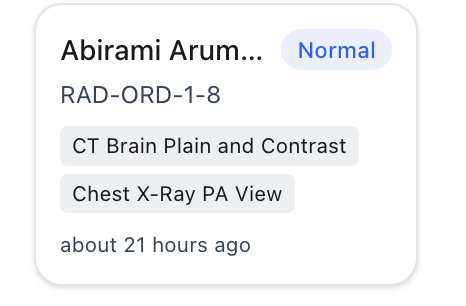
- Open Radiology Orders (Kanban view) and find an order whose card lists two tests, for example RAD-ORD-1-11 (CT Brain Plain and Contrast and Chest X-Ray PA View).
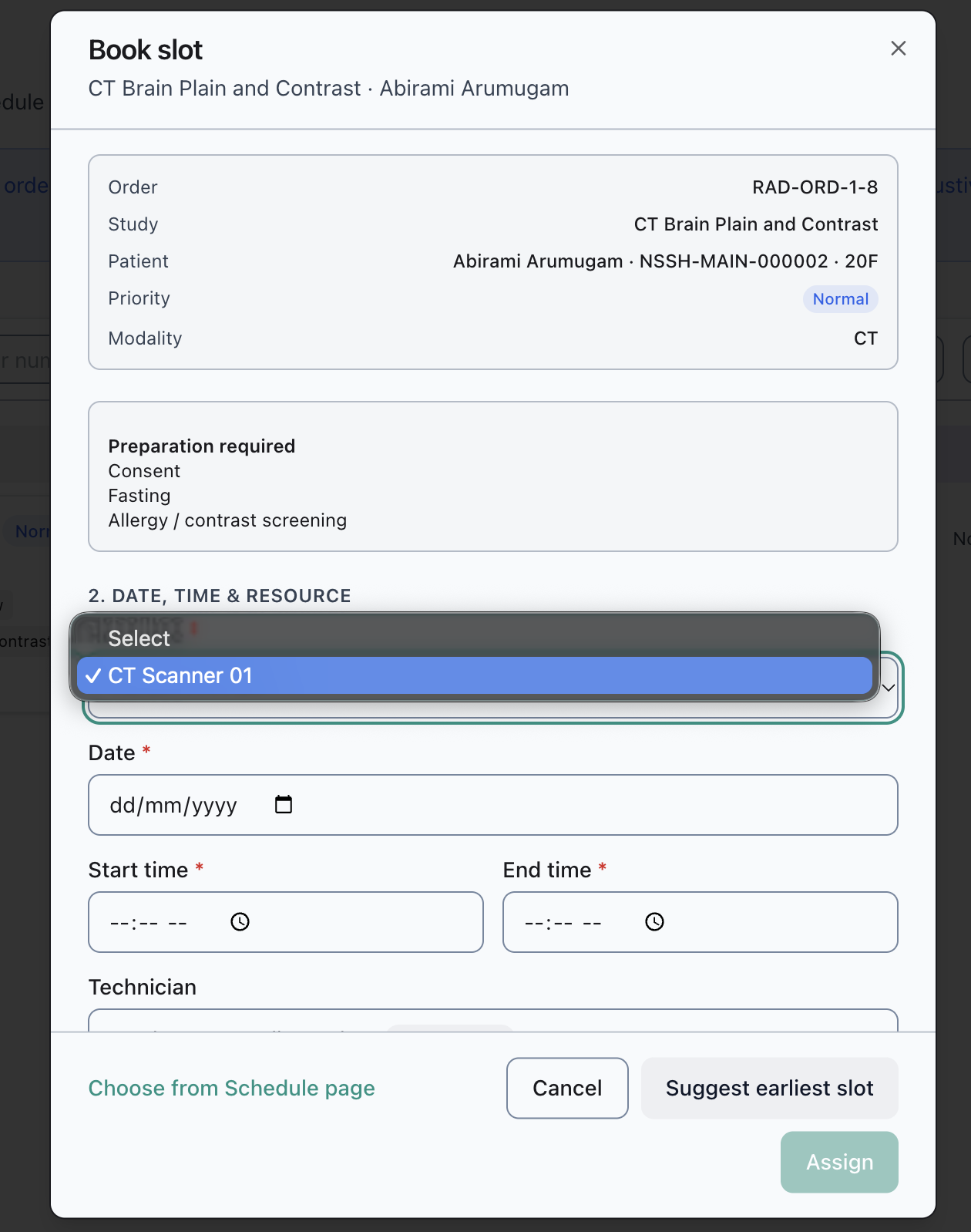
- Click the card. This opens a "Book slot" dialog.
- Note the Study and Modality shown at the top of the dialog, and the options offered in the Resource dropdown.
- Cancel out and go to the Schedule page. Filter the modality selector to the first test's modality (CT) and look under "Unscheduled" for the order.
- Switch the modality filter to the second test's modality (X-Ray) and look under "Unscheduled" again for the same order.
Expected vs Actual
Expected: both tests on a multi-test order can be scheduled independently — either the Book slot dialog lets you choose which test you're booking, or there's some other way for each test to reach a machine. At minimum, the Schedule page's Unscheduled list for each test's own modality should include it.
Actual, on RAD-ORD-1-11:
Clicking the order's card opens a Book slot dialog titled only "CT Brain Plain and Contrast · Pavithra Ezhilarasan." It shows one Study row, one Modality (CT), and a Resource dropdown with exactly one option, "CT Scanner 01." Nothing in the dialog mentions the order's second test, Chest X-Ray PA View, and there's no control to switch to it or add it.
On the Schedule page, filtered to CT, RAD-ORD-1-11's CT Brain Plain and Contrast test correctly appears under "Unscheduled." Filtered to X-Ray, the Unscheduled list reads "None" — the order's Chest X-Ray PA View test isn't on the X-Ray board at all, not scheduled and not waiting to be scheduled. It isn't reachable from the scheduling system through either path tried.
Meanwhile the order itself, on both the Kanban card and in Table view, keeps showing both tests and a "2 tests" count, with nothing to indicate the second one has effectively fallen out of the workflow.
A second order confirms this isn't specific to RAD-ORD-1-11. RAD-ORD-1-14 (Patricia), a fresh two-test order (Chest X-Ray PA View and CT Brain Plain and Contrast) still sitting in Waiting, shows the same pattern one stage earlier: its triage popup correctly lists both tests under "Study," but the "Modality" field right below it shows only "X-Ray" — with no mention that the order also needs a CT. Someone triaging from this popup alone would have no way to know a CT is required. (This order hasn't reached Queued yet, so it wasn't checked against the Schedule board the way RAD-ORD-1-11 was.)
Files
AV Updated by Alminta V. 23 days ago
- Status changed from New to Resolved
- Assignee changed from Alminta V. to Roshni Harish.
- Resolved By set to Alminta V.
RH Updated by Roshni Harish. 22 days ago
- Status changed from Resolved to Closed