Bug #469
closedOrder Status Never Updates After Report Is Signed and Finalised
0%
Description
Once a radiologist signs and finalises a report — and even after a critical finding on it has been flagged and paged — the order still looks unfinished everywhere in the Radiology Orders module. The Worklist board, its Table view, and the order's own quick-view popup all keep showing it as not yet reported, while Finalised Reports and Critical Findings both correctly show the work as done.
Impact
High. The Orders module is the screen staff use to track what's still outstanding. If a finished study permanently looks unfinished there, a completed, already-communicated critical finding could be re-read or chased as if it were still pending, and genuinely outstanding orders become harder to tell apart from ones that are actually done. This isn't a display-only quirk — the order's status in this module appears to simply never transition, which affects every order once it's reported, not just this one test case.
Environment
Tested on https://nssh.demo.clinq.health (NSS Hospital demo, build v2026.10.11), Diagnostics > Radiology, live-reproduced end to end on 20 Oct 2026 using order RAD-ORD-1-9 (Nandhini Balasubramaniam, CT Brain Plain and Contrast, Stat priority). Logged in as clinq.dev@gmail.com (admin). This was a real action taken on the live demo system, not a read-only check — the report was genuinely signed, finalised, and a critical finding was genuinely flagged and paged, as a deliberate test of the critical-findings workflow.
Steps to Reproduce
- Open the Reading Worklist and note that the order is listed there with status "Acquired," awaiting a radiologist read.
- Open the order in the Read Cockpit, fill in Findings and Impression, click "Sign & finalise," and confirm in the dialog that appears.
- Once signed, a "Flag critical finding" button appears on the Read Cockpit. Click it, choose a Notified Person, leave the notification method as Phone, check "Read-back confirmed," and click "Flag & page."
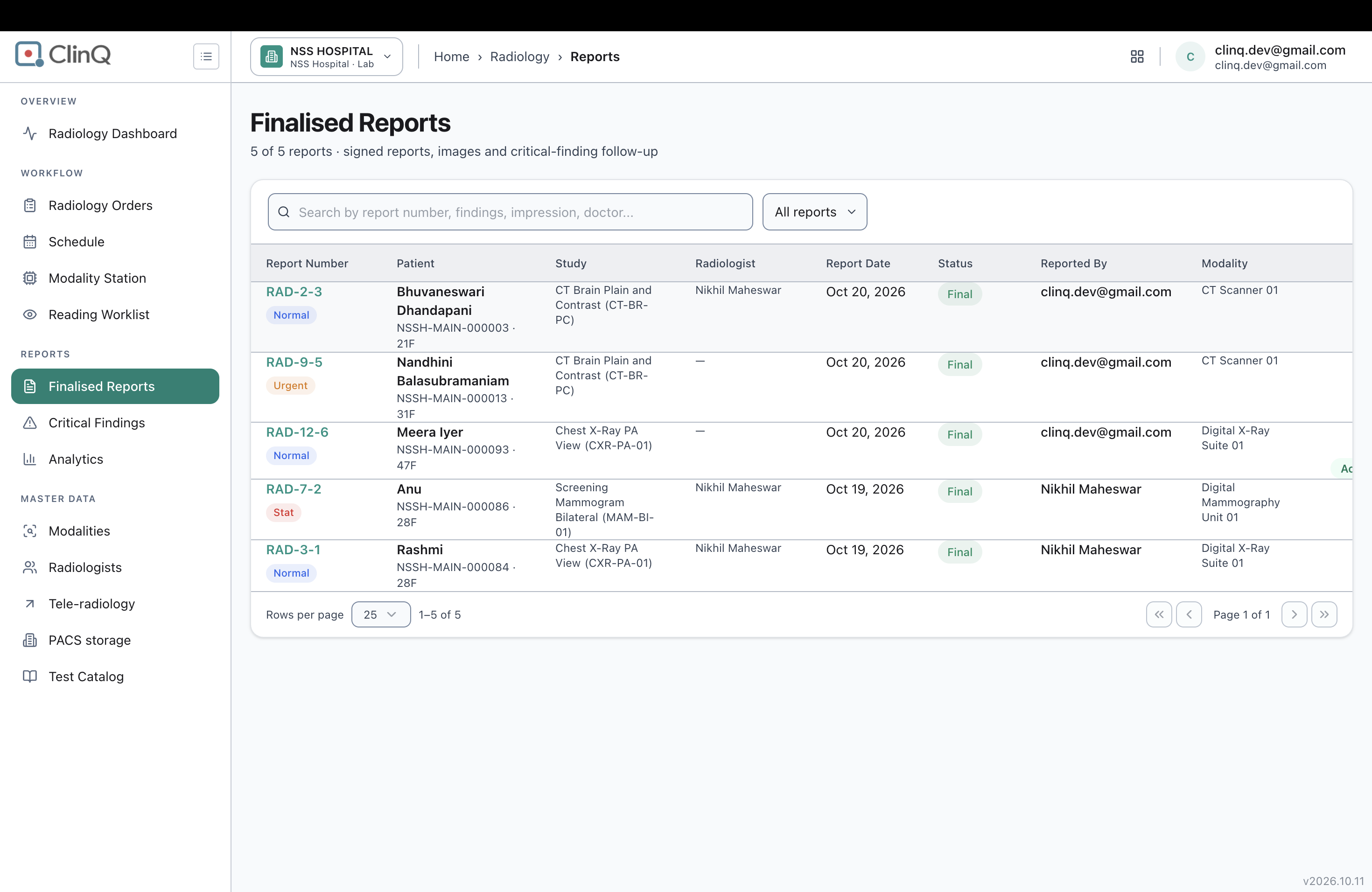
- Go to Finalised Reports and confirm the report now appears there with status "Final."
- Go to Critical Findings and confirm the flagged finding now appears in the log.
- Go back to the Reading Worklist and confirm the order has dropped off that list (it has — the count went from 3 studies to 2).
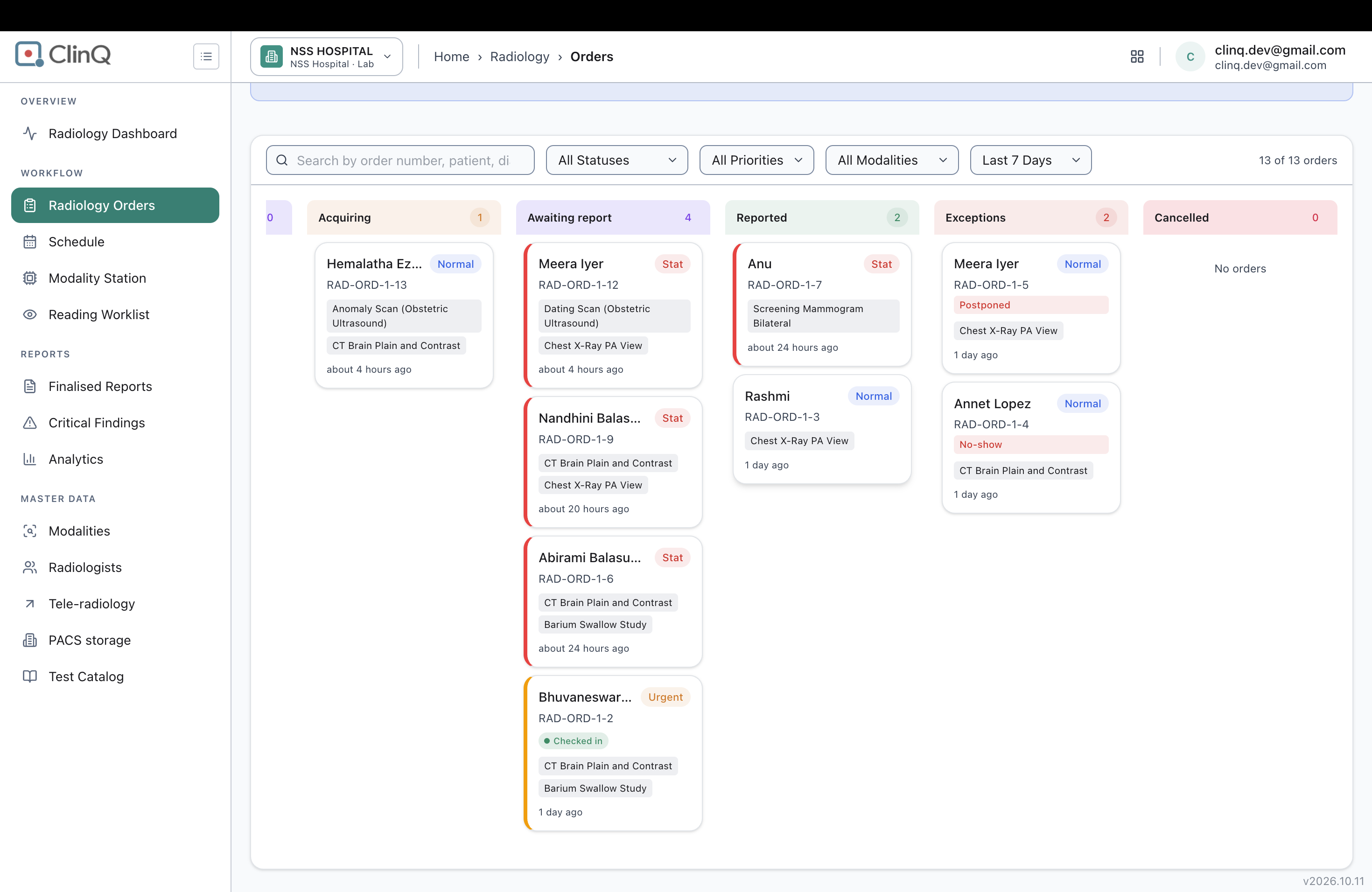
- Go to Radiology Orders (the Worklist/Orders board) and check the order's status in the Kanban view, the Table view, and its quick-view popup.
Expected vs Actual
Expected: once a report is signed and finalised, every screen that shows this order's status reflects that it's done, the same way Finalised Reports and Critical Findings already do.
Actual, checked a few minutes after signing and finalising, on a fresh page load each time:
Radiology Orders, Kanban view: the order is still listed under the "Awaiting report" column, not "Reported." The column counts hadn't moved either — "Awaiting report" was still 4 and "Reported" was still 2, instead of 3 and 3.
Radiology Orders, Table view: the Status column still reads "Pending" for this order, not "Completed."
The order's own quick-view popup (opened from either view): still reads "Status: Acquired, awaiting radiologist read," and still offers an "Open in Reading cockpit" button — exactly as if the study had never been opened, read, or signed at all.
By contrast, Finalised Reports correctly lists the report (RAD-9-5, status "Final," Reported By clinq.dev@gmail.com), and Critical Findings correctly logged the flagged finding (Notify Sent, notified person Dr. M. Ashika, method Phone, timestamped Oct 20, 2026 13:36). So the reporting and critical-findings side of the system knows the work is done; the order-tracking side does not.
Files
AV Updated by Alminta V. 23 days ago
- Status changed from New to Resolved
- Assignee changed from Alminta V. to Roshni Harish.
- Resolved By set to Alminta V.
RH Updated by Roshni Harish. 22 days ago
- Status changed from Resolved to Closed